Monthly Archives: November 2014
Python – Understanding GIL
A few notes:
- -=, //
- Thread.join
- dis.dis
- MAC: sysctl hw
Cherrypy – A minimal python web framework
When I first saw the description of the python package Cherrypy, my first question is “another web framework? what is the difference between Cherrypy and Flask?”. Then I typed “flask vs” and “cherrypy vs”, you can see there are a whole family of packages in Python to offer similar functionalities, like flask, cherrypy, bottle, pyramid, beaker, tornado, django..etc.
Here is an interesting Stackoverflow conversation that explained some difference between Flask and Cherrypy and seems like you can use the Flask as the framework and Cherrypy as the backend server to guarantee the “solid rock” performance.
MySQL – conversion between flat file and mysql table
LOAD DATA INFILE is the complementary of SELECT INTO OUTFILE.
When you use LOAD DATA INFILE, you can either load from a file resides on the same box as MySQL server, and also, you can specify the LOCAL INFILE so you can load a file from client file system to load the data into a table on the remote side.
However, when you use SELECT INTO OUTFILE, there is no option like SELECT INTO LOCAL OUTFILE where you can specify to write the file into local. In another way, you can only load the file to the remote server, and if you don’t have access to the filesystem, then you can not access the file.
“If you want to create the resulting file on some other host than the server host, you normally cannot use SELECT ... INTO OUTFILE since there is no way to write a path to the file relative to the server host’s file system.”
They mentioned a few approaches to work around that limit, like `mysql -e “select from..” > mylocalfile`, which requires the mysql client to be installed on the client side, which is the equivalent of exporting the select results in my sequel pro.
Beyond the discussion about if you can read/write SQL result to either remote/local filesystem, there is a format clause where you might need to pay attention to. The syntax for the COLUMNS and LINES clauses is the same for both SELECT INTO OUTFILE and LOAD DATA INFLE.
Those formats are optional and the value would be like below when they are omitted.
FIELDS TERMINATED BY '\t' ENCLOSED BY '' ESCAPED BY '\\'
LINES TERMINATED BY '\n' STARTING BY ''
Which might be different from the formats of the client software that you were using. For example, here is the format when I export from my Sequel Pro client.

And here are a few examples that showed the output of testing.
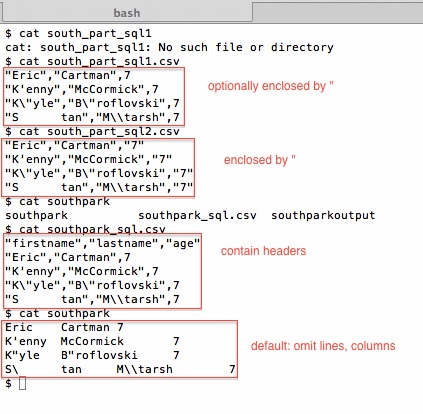
Lesson, if you don’t pay attention to the column format before you load data, you might have the command run successfully, and the loaded data is completely messed up.
Audacity – a free, open-source audio editing software across platforms
I was trying to find a free software to record my voice to help me improve my English pronunciation, then I came across this software – Audacity. It is hosted on sourceforge and it has been released since 2004. I realized it was written in C(/C++) as you can see from the SVN repository.
Here is a screenshot of how this software looks like on my windows computer.
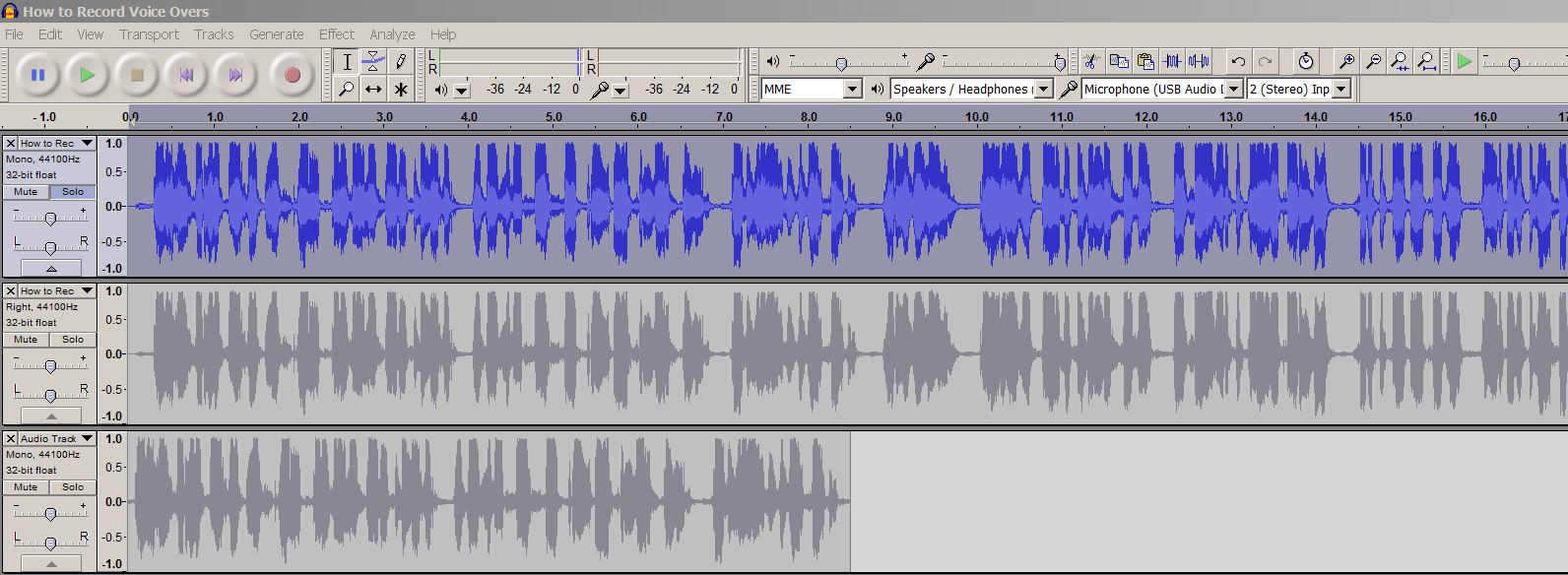
This tools is pretty friendly and handy enough for a complete audio layman like me. You can also use keyboard shortcut you help you boost your editing efficiency.
Here is also an awesome youtube videos from videomaker that will give you a brief idea of how much work you need to, or could be done to record a voice like a pro 🙂
English – Pronunciation: rebecca linquist
I came across this awesome youtube videos, the lecturer made a video targeted at the Chinese English speaker. She mentioned a few tricks that I think will be super helpful to improve my English pronunciation.
- Open your mouth
- pay attention to the airflow
- record your speech
- focus on loudness to make sure you don’t truncate or shorten word ending.
- follow a model, celebrities..etc.
pay more attention to communication and people.
It has been almost two years since I started writing my first line of code to solve business problems. There are many definitions of data scientists here and there, but the one definition that I agreed with the most is that a data scientist is the intersection of business knowledge, math and computer science. I created this blog to take notes of some technical knowledge I have learned now and then and seems like it is really helpful so far.
However, sometimes I ask myself. Is this the best you can do? Will you be qualified for a higher level in what you are doing? Will you be able to manage a team of data science talents who is as good as you, much better than you or even much worse than you? Whenever I think about those questions, I think my smallest circle is this business circle, not because I don’t understand how to improve margin, how to optimize inventory, but I feel much less confident communicating with the business and communicate effectively with them to let them understand the output of my awesome code and convince them of my understanding and guide them to make better decisions.
It has been three years since I came to the US, and of course, English is not my first language, but still I speak English with very thick accent right now. Even if I can buy myself food and communicate with my coworkers to get my work done. I am still far away from communicating effectively. So it ended up in a situation where I prefer sitting in front of computer learning new technologies to talk to my colleagues. And I can see where this is heading to, a direction where doesn’t line up with what I want.
There is an old saying in China which is “学而优则仕“, the direct translation is “a good scholar can be a official”. And my understanding is that a smart person who has the area specific knowledge should also know the importance of leveraging people instead of doing it by him alone. You might study really hard and out performed all your peers and even despise the work they have done. However, the last thing that you ever want to happen is that you end up doing everything yourself and as days go by, you become cynical and totally lost the understanding of team work and collaboration.
From now on, I will post more content of English itself and possible work that will help me become a “perfect story teller”. I think it is important and I think I should do it.
Processing – p5.js, a javascript library that translate processing code
Here is the website of this javascript library. You can translate processing code into HTML element without the full processing environment. People tend to write processing code in the IDE and then export it to javascript whenever they are happy and embed the code on their website, like this. I feel like right now. I feel we can totally write processing in sublime now and test it in browser 🙂


Hive – Timestamp format
Yesterday in a format like ‘20140101’
FROM_UNIXTIME(UNIX_TIMESTAMP()-1*24*60*60,’YYYYMMdd’)
Versus the dumb version:
10000*year(from_unixtime(unix_timestamp())) + 100*month(from_unixtime(unix_timestamp())) + 1*day(from_unixtime(unix_timestamp()))
As you can see from the date functions in Hive documentation, where M actually stands for month in Hive where it stands for minute in POSIX..
Github – something about SSH and HTTPS
All the interactions with Github involve talking to a remote server that through a channel as default, either use ssh(22) or https(443). Depending on your environment, you might be in a situation where you have certain ports blocked.
The safest bet is to use SSH method all the time because if you don’t have SSH port open, you even cannot log into the box to do any operation. i.e., if you are even thinking about git clone..etc, you are probably already saying the SSH port is already open. Here is a detail tutorial demonstrating how to access git using ssh. In a short sentence, you need to copy you public ssh key and manually added it to your github account access group. And then you should be able to access your github account using ssh.

On github’s website, they also mentioned another scenario where “SSH is not fully enabled“, in that case, you can ssh into github using another commonly open port HTTPS(443) by using command “ssh -T -p 443 git@ssh.github.com” where -T will disable pseudo TTY allocation and -p will do port forward(which port to connect on the host side).
Also, it might be interesting to look at the format of repository address depending on which method you approach.
SSH: git@github.com:<username>/<reponame>.git
HTTPS: https://github.com/<username>/<reponame>.git
SSH(over 443): git@ssh.github.com:<username>/<reponame>.git
 datafireball