Following the first post of RAG in 5 lines, this post will cover what is happening behind the scene in more detail, what are some of the knobs you can tune so better understand the working internals of llama_index.
- Data Volume
- Chunk
- Document Store
- Embedding
- Vector Store
- easter egg – not matching embedding
- Query
- Synthesis
- Summary
llama-index has done such a good job abstracting away the complexities behind the index and query commands. I mentioned that it took me almost 90 seconds to index the 10 articles.
Data Volume
Now let’s look back at how much data that we are working with.
import tiktoken

data_directory = './data'
encoder = tiktoken.get_encoding('cl100k_base')

total_token = 0
total_file_size = 0
total_char_size = 0
for file_name in os.listdir(data_directory):
    file_path = os.path.join(data_directory, file_name)
    with open(file_path, 'r', encoding='utf-8') as file:
        text = file.read()
        token_count = len(encoder.encode(text))
        print(f"File: {file_name}, Token Count: {token_count}, FileSize: {os.path.getsize(file_path)}")
        total_token += token_count
        total_file_size += os.path.getsize(file_path)
        total_char_size += len(text)

print(f"Total token count: {total_token}")
print(f"Total char size: {total_char_size}")
print(f"Total file size: {total_file_size}")
print(f"Average token size: {total_file_size/total_token}")
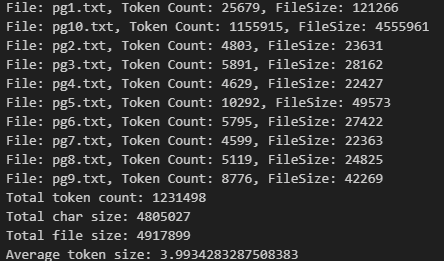
The 10 book occupy about 4.9MB in total in plain text format, by using the cl100k_base BPE, we know they contain in total about 1.2 million tokens. On average, each token takes 4 bytes.
I want to admitthat I had a false start at the beginning. Initially I wanted to index 100 books, then I stopped it after noticing how long the wait was and later changed to 10 books. Now, by noticing that our API usage has 1.9 million tokens in total, that roughly line up with our total number of tokens 1.2 million. (the additional 0.7 million was probably due to my false start).
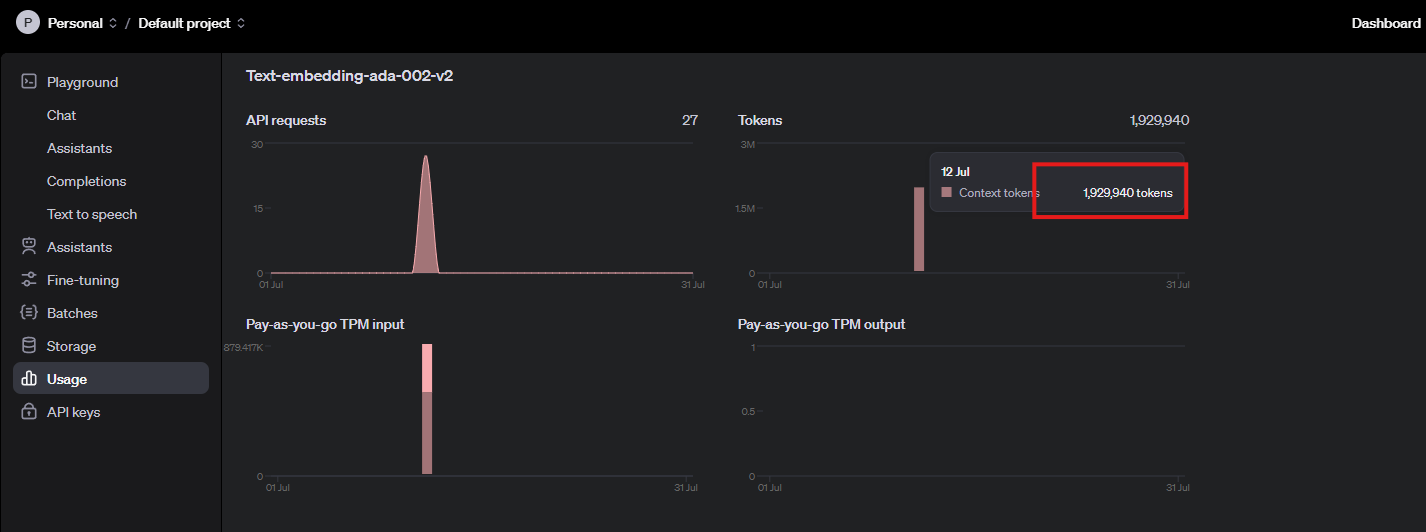

The theoretical API throughput should be 5M tokens per minute, and our indexing process was about 500K per minute (~10%), this is very slow by default. later on, we can discuss why this happened and how to address it.
Chunk
A key step is RAG is to properly break larger documents into smaller pieces and index them accordingly. In the 5 liner example, there is no place to find the details about how each document is broken down into its own chunks, it is because there are very extensive default settings where the configurations were set there. That means users still have the freedom to customize but if you do not know, there is a default setting for your application.
you can access the default setting by running the following command:
from llama_index.core import Settings
print(Settings)
_Settings(
    _llm=OpenAI(
        callback_manager=<llama_index.core.callbacks.base.CallbackManager object at 0x000001C41069AA10>,
        system_prompt=None,
        messages_to_prompt=<function messages_to_prompt at 0x000001C4638B39C0>,
        completion_to_prompt=<function default_completion_to_prompt at 0x000001C46395E3E0>,
        output_parser=None,
        pydantic_program_mode=<PydanticProgramMode.DEFAULT: 'default'>,
        query_wrapper_prompt=None,
        model='gpt-3.5-turbo',
        temperature=0.1,
        max_tokens=None,
        logprobs=None,
        top_logprobs=0,
        additional_kwargs={},
        max_retries=3,
        timeout=60.0,
        default_headers=None,
        reuse_client=True,
        api_key='...',
        api_base='https://api.openai.com/v1',
        api_version=''
    ),
    _embed_model=OpenAIEmbedding(
        model_name='text-embedding-ada-002',
        embed_batch_size=100,
        callback_manager=<llama_index.core.callbacks.base.CallbackManager object at 0x000001C41069AA10>,
        num_workers=None,
        additional_kwargs={},
        api_key='...',
        api_base='https://api.openai.com/v1',
        api_version='',
        max_retries=10,
        timeout=60.0,
        default_headers=None,
        reuse_client=True,
        dimensions=None
    ),
    _callback_manager=<llama_index.core.callbacks.base.CallbackManager object at 0x000001C41069AA10>,
    _tokenizer=None,
    _node_parser=SentenceSplitter(
        include_metadata=True,
        include_prev_next_rel=True,
        callback_manager=<llama_index.core.callbacks.base.CallbackManager object at 0x000001C41069AA10>,
        id_func=<function default_id_func at 0x000001C4639A0900>,
        chunk_size=1024,
        chunk_overlap=200,
        separator=' ',
        paragraph_separator='\n\n\n',
        secondary_chunking_regex='[^,.;。?!]+[,.;。?!]?'
    ),
    _prompt_helper=None,
    _transformations=[
        SentenceSplitter(
            include_metadata=True,
            include_prev_next_rel=True,
            callback_manager=<llama_index.core.callbacks.base.CallbackManager object at 0x000001C41069AA10>,
            id_func=<function default_id_func at 0x000001C4639A0900>,
            chunk_size=1024,
            chunk_overlap=200,
            separator=' ',
            paragraph_separator='\n\n\n',
            secondary_chunking_regex='[^,.;。?!]+[,.;。?!]?'
        )
    ]
)
in the default setting, you can find a lot of useful info like it is using open_ai 3.5turbo as the default LLM and use openai ada002 as the default embedding model. Then you can find they are using the chunk_size of 1024 with a 200 overlap as the sentence splitter.
I will not dive too deep into how chunking works, but you should totally check out the ChunkViz from Greg Kamradt.
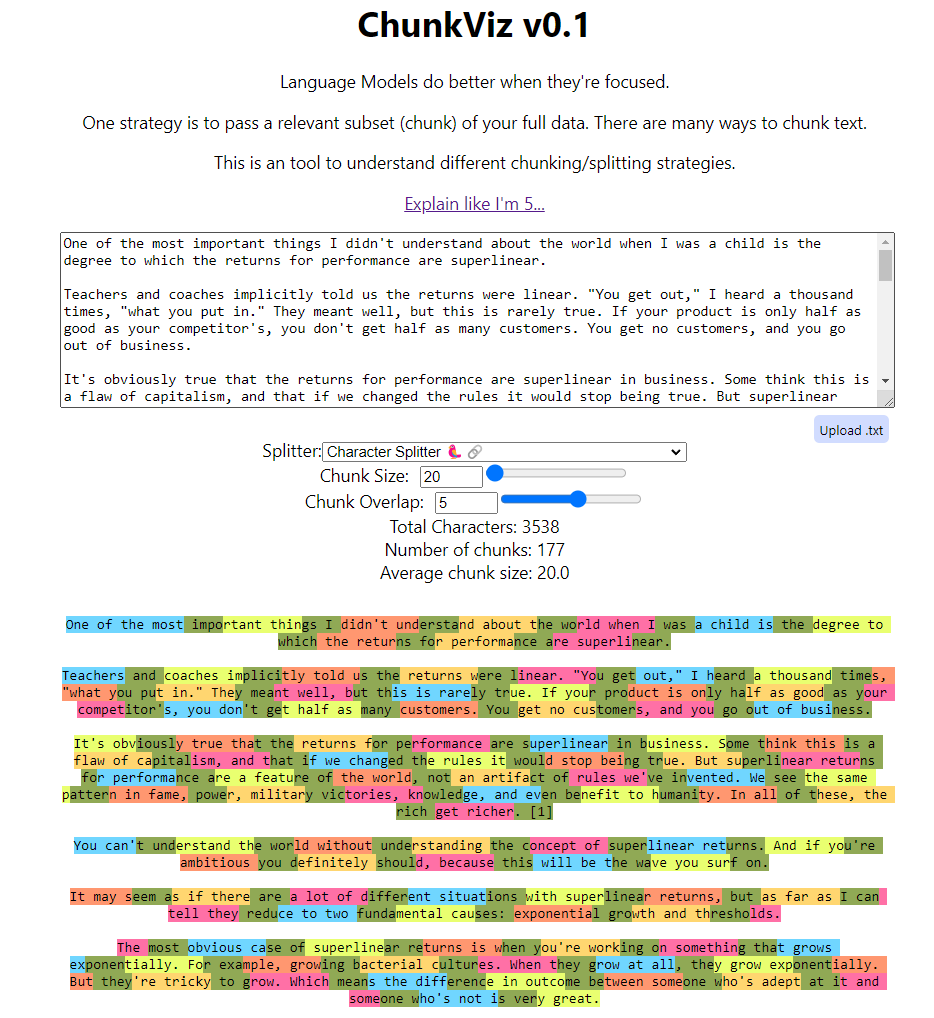
In the previous section, we know there are about 1.2 million tokens in total. If the chunk size is 1024 with an overlap of 200, we might have ~800 tokens per chunk, which translates to 1.2 million / 800 ~ 1,500 chunks. Now let’s verify whether that was the situation.
>> len(index.docstore.docs)
1583
Document Store
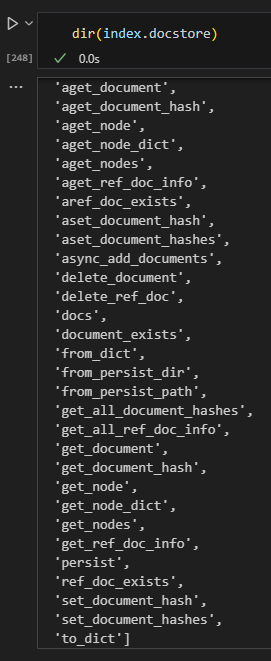
Since now we verified that the raw documents got split into smaller chunks. These smaller documents are now stored in a docstore which is within the index object. as default, the index is using almost a python dictionary which is called SimpleDocumentStore to stores the raw text.
The code below is to iterate through all the docs. Here we print out the first element in the dictionary with its key, its text, number of tokens, and number of characters. Again, we can verify that the token size is within the 1024 chunk size limit and there is on average a 4 to 1 relationship between the number of characters and the number of tokens.

Like any database / store, the document store has many operations mainly around getter/setter, just like the CRUD operations for a database.
Embedding
Embedding is a numerical representation of an entity, in this case, a chunk. based on the default setting, we know they are being batched sent to openai api with a batch size of 100. Given that we have 1,500 chunks, this should translate to 15 requests at most.

Again, it is very likely that we wasted some requests while trying to index 100 docs at the beginning, this verified our hypothesis that the batch indexing is working as expected.
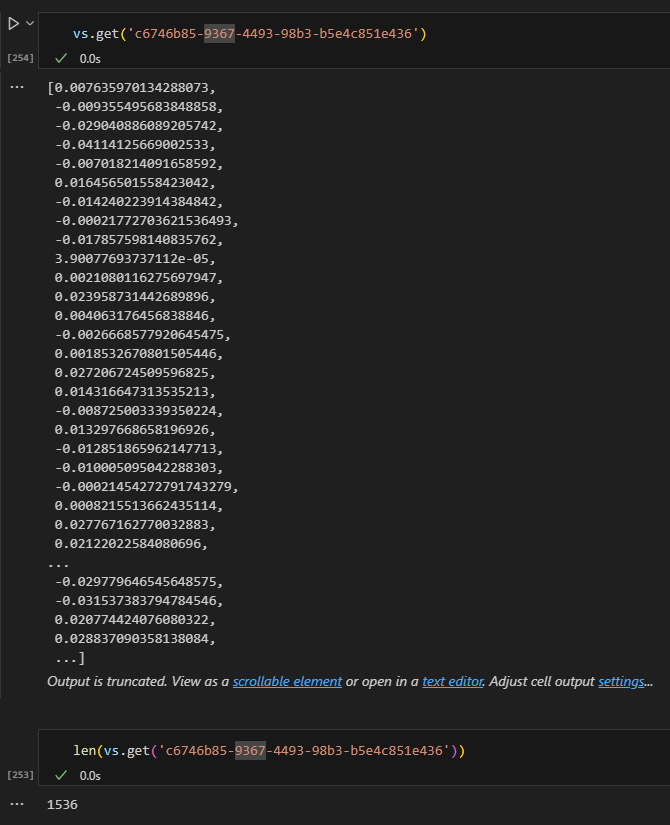
All the embeddings are stored in the vector store.
Vector Store
The vector store is yet another place where all the embeddings are stored, in addition, there are a lot of metadata also stored there representing the underlying document.
for k, v in vs.data.metadata_dict.items():
    print(k)
    pprint.pprint(v)
    break
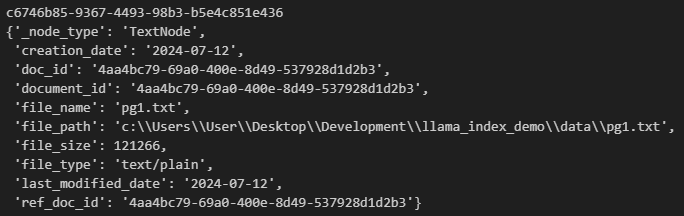
for k, v in vs.data.embedding_dict.items():
    print(k, v)
    break

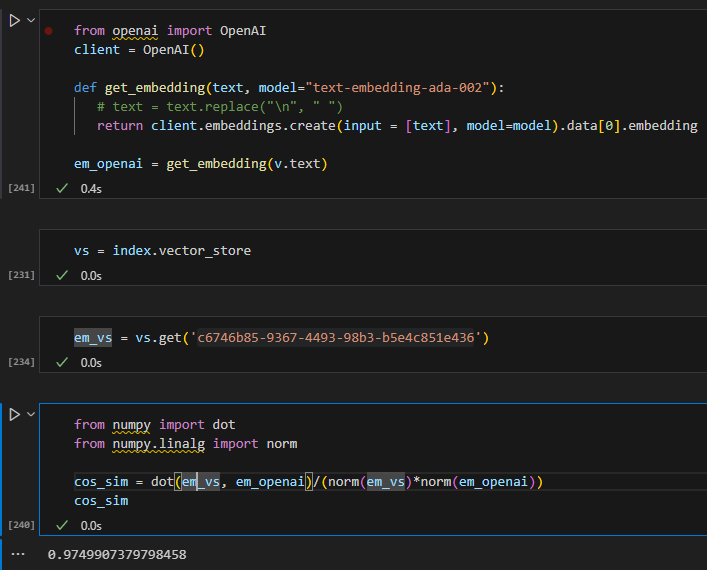
easter egg – not matching embedding
I tried to generate the embedding for a doc myself and compare to its stored embeddings in the vector store, even if they are very similar, I cannot seem to match them 100%. I will not be surprised if there is some pre/post processing somewhere to remove non-printing characters but this is good enough 🙂
Query
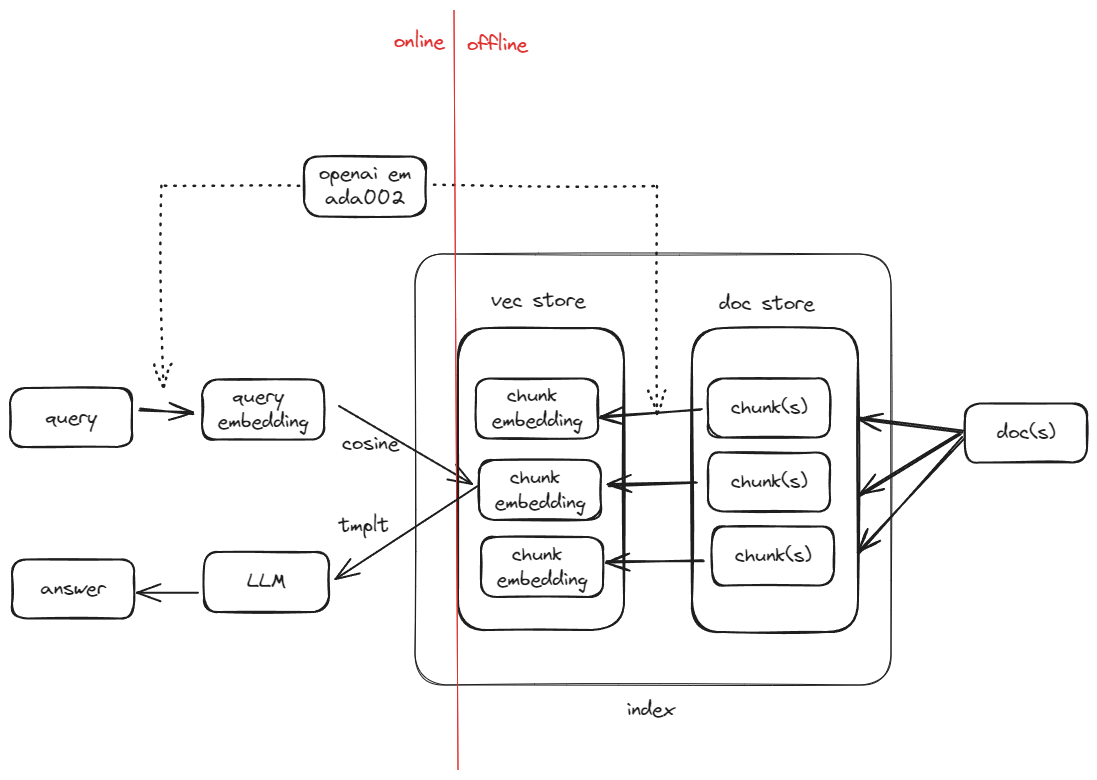
behind the scene of query_engine.query, it converts the query into its embedding and searches it against the vector store to get the best matched record(s). In fact, a simple query_engine will be converted into a retriever which is an synonym in this case.
The code below demonstrated that the query_engine.query will pass in the query as a QueryBundle object.
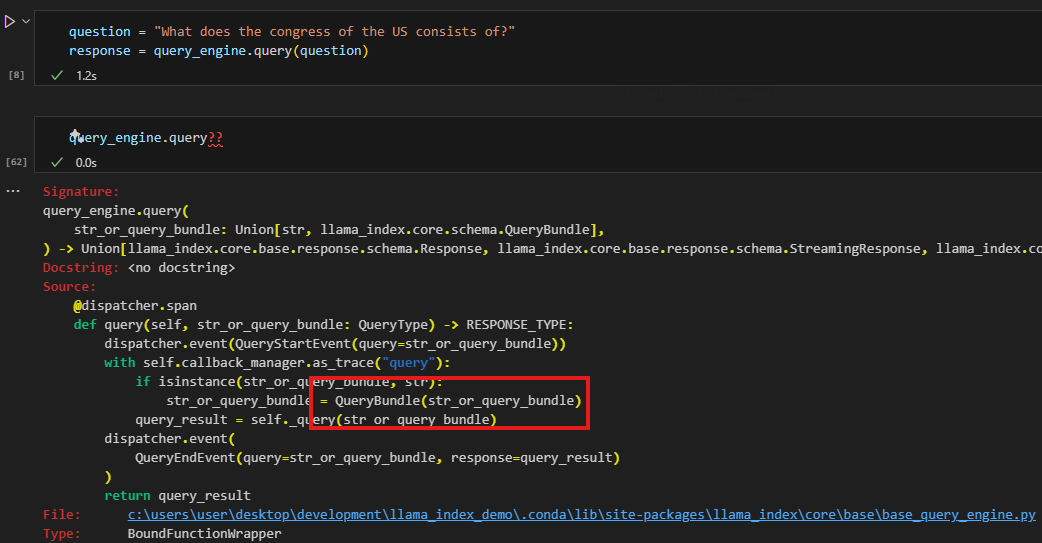
from llama_index.core.schema import QueryBundle

# Step 1: Generate embeddings for the query
em_query = get_embedding(question)

# Step 2: Create a QueryBundle
query_bundle = QueryBundle(question)

# Step 3: Retrieve nodes using the retriever
retriver = index.as_retriever()
nodes = retriver.retrieve(query_bundle)
Here we directly calculate embeddings for the query using openai api, and then pass the question to initialize a QueryBundle object that will be used to for retrieval.
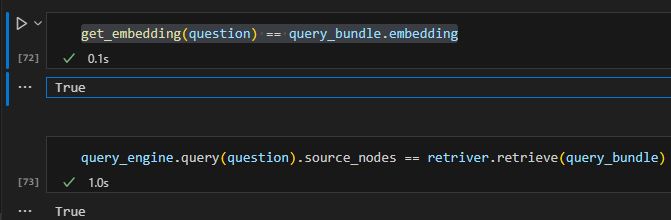
Now we can have two observations (at least in this simple 5 liner scenario):
1. query_bundle simply takes the query and embeds it
2. the query_engine.query is running retriever.retrieve behind the scene
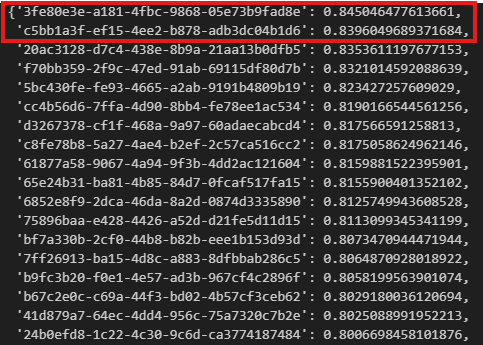
now, let’s try to manually verify the outcome. If we generate the embeddings for the query via openai. Then we can iterate through the vector store and calculate the pairwise cosine similarities, we store the similarities in a dictionary and then we can sort it and highlight the top 2 most similar items.
Based on the outcome, we can verify that the two records 3fe and c5b are the top two results and our similarities match llama-index retrieved too, even their similarity scores match perfectly.
vs.query(VectorStoreQuery(query_embedding=[em_query], similarity_top_k=2))
VectorStoreQueryResult(nodes=None,
similarities=[array([0.84504648]),
array([0.83960497])],
ids=[‘3fe80e3e-a181-4fbc-9868-05e73b9fad8e’,
‘c5bb1a3f-ef15-4ee2-b878-adb3dc04b1d6’])
dict_similarity = {}
for k, v in vs.data.embedding_dict.items():
    cos_sim = dot(v, em_query)/(norm(v)*norm(em_query))
    dict_similarity[k] = cos_sim

sorted_dict_similarity = dict(sorted(dict_similarity.items(), key=lambda x: x[1], reverse=True))
sorted_dict_similarity
Synthesis
Now we have located the chunk that is semantically most similar to the query, we still need one more step to further refine in order to provide a concise yet relevant answer. Otherwise, the user is asking “what consistite the US congress”, and we returns a big chunk of text from the constitution for the user to read. This step will need to distill the chunk(s) down to a one or two sentences. In our example, it can even be as short as “house of representative and senate”.
In Llama-index, it is achieved via a component called synthesizer. The retrieved nodes will be served as context, along with the query will be fed directly to a LLM to refine.
l# lama_index.core.prompts.default_prompts.py
DEFAULT_TEXT_QA_PROMPT_TMPL = (
    "Context information is below.\n"
    "---------------------\n"
    "{context_str}\n"
    "---------------------\n"
    "Given the context information and not prior knowledge, "
    "answer the query.\n"
    "Query: {query_str}\n"
    "Answer: "
)

Summary
 datafireball