Cloudera Manager – tsquery

The CDH is one of the most mainstream big data platforms which packages well all the related big data tools into one environment and make you safe hours installing everything from scratch.

Meanwhile, Cloudera Manager is also one of the benefit of using CDH because it really gives you a handy GUI for you to monitor and even configure the environment.

Cloudera uses tsquery to pull the time series data regarding certain metrics. Say for example, there is a metric called “cpu_user_time”, it has an interesting unit of measure like “seconds/second”. It took me quite a while to double check all the numbers to finally understand what it means, but it is basically the cumulative CPU time across the multiple cores or even nodes. Say you have 3 datanodes and 12 cores each. Assuming your job is really stressing the cluster and we have 3*12=36 cores running in parallel at the same time, then at that moment, we are supposed to have a “cpu_user_time” under your account that has a value of 36seconds/second. Of course, when talking about CPU usage, a percentage between 0% and 100% is probably more straight forward which 0% means completely idle and 100% means fully utilized.  In that case you can write a tsquery to be something like this:

select cpu_user_time / getHostFact(numCores, 1) / {numberOfHosts}  * 100

Here getHostFact(numCores,1) will return the number of cores and use 1 as default value is not available. I have not figured out how to retrieve the number of hosts/data nodes using tsquery but you should get the idea, 100 turns decimal into a percentage that is more user friendly.
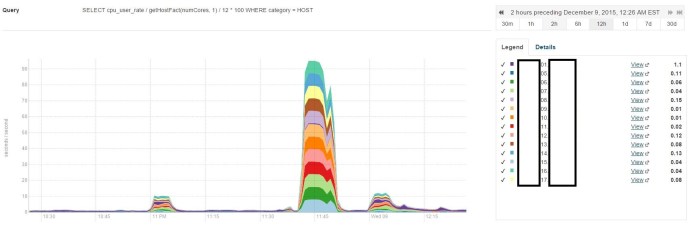
tsquery

As you can see, I have 14 nodes in this environment and two of them acted as the name node and backup name node, that is why when I write my query, I divide by the number 12.

well. the next step is to do some scientific research figuring out what is the CPU usage across time, something like the integral of the CPU usage across time over the total timeline or simply the average if the distribution is even.

Hive – Variable Substitution

I am planning to write a query that pull relevant rows using the `in` keyword where the list is pretty long, like 20 different elements, what is even worse, I need to run this query against many different tables.

The query will look like this:

create table mytable as 
select * from (
select * from table1 where mycolumn in (value1, value2, value3, value4 ..)
union all
select * from table2 where mycolumn in (value1, value2, value3, value4 ..)
union all
select * from tablen where mycolumn in (value1, value2, value3, value4 ..)
union all
... ) unionresult

Clearly, a professional developer will start thinking about how to optimize the query to remove the highly repetitive syntax. Clearly, there is a feature in Hive called “variable substitution” that will help me.

set mylist = (value1, value2, value3, value4 ..)
create table mytable as 
select * from (
select * from table1 where mycolumn in ${hiveconf:mylist}
union all
select * from table2 where mycolumn in ${hiveconf:mylist}
union all
select * from tablen where mycolumn in ${hiveconf:mylist}
union all
... ) unionresult

Clearly, this approach will help whenever you think you need a variable. 🙂

OPENSSL Public Key En/Decryption and Signature Verification

I took some notes here for quick reference.
openssl version
man openssl

# A pub/priv key
openssl genpkey _Algorithm RSA -pkeyopt rsa_keygen_bits:2048 -pkeyopt rsa_keygen_pubexp:3 -out privkey_A.pem
openssl pkey -in privkey_A.pem -out pubkey_A.pem -pubout
# B pub/priv key
openssl genpkey _Algorithm RSA -pkeyopt rsa_keygen_bits:2048 -pkeyopt rsa_keygen_pubexp:3 -out privkey_B.pem
openssl pkey -in privkey_B.pem -out pubkey_B.pem -pubout

# inspect
openssl pkey -in -text | less

# message.txt
echo ‘This is a test message sent from A to B’ > message.txt
# signature.bin
openssl dgst -sha1 -sign privkey_A.pem -out signature.bin message.txt
# ciphertext.bin
openssl pkeyutl -encrypt -in message.txt -pubin -inkey pubkey_B.pem -out ciphertext.bin

# decrypt
openssl pkeyutl -decrypt -in ciphertext.bin -inkey privkey_B.pem -out received-message.txt
# verify
openssl dgst -sha1 -verify pubkey_A.pem -signature signature.bin received-message.txt

Here is also a quick flow chart that I drew in Gliffy:
priv_pub

Here is a few take-aways from the plot:

(1) Private key is private, use to decrypt and should never share

(2) Public key is public, you can share it with anyone who is going to send you file and they gonna use it to decrypt

(3) The sender’s keys (pubic/private) are only used to verify the signature.

STUDY NOTES CRYPTOGRAPHY I – Statistical Tests

Statistical test on {0,1}^n:

an algorithm A such that A(x) outputs “0”(not random) or “1”(random)

A(x) = 1 if and only if the number of generated 1s are not hugely different from the number of 0s

A(x) = 1 if and only if the number of two consecutive 0s are not dramatically different from a quarter of the total number of bits.

A(x) = 1 if and only if max-run-of-o(x) <= 10 * log2(n)

Advantage[A,G] = | Pr[A(G(k))=1] – Pr[A(r)=1] |

Advantage close to 1 -> A can distinguish G from random

Advantage close to 0 -> A cannot distinguish, or the PRG is pretty much like random

secure PRG <=> Advantage[A,G] is negligible for all efficient statistical tests.

Thm(Yao’82), an unpredictable PRG is secure

STUDY NOTES CRYPTOGRAPHY I – Block Ciphers

Stream Ciphers, making OneTimePad practical by replacing random key by pseudorandom key.

At the second week, prof. Bonet talked about a few weak PRGs that are not recommended to be used in cryptography.
One is the linear congruential generator(LCG), and glibc randomizer. I also took a quick look a the built-in random number generator for python which uses Mersenne Twister as the core generator. Also, they mentioned “is completely unsuitable for cryptographic purposes”.

Negligible factor where epsilon is greater than 1/(2^30), likely happen over 1GB of data.

And when epsilon is smaller than 1/(2^80), then it won’t happen over life of key.

They the professor mentioned the convention later on in this course that factor will be negligible when it is exponential and non-negligible when it is polynomial.

Attack1: two time pad is insecure, when you use the same key to encrypt two messages, the eavesdropper capture the cipher, and simply run the xor of the cipher which turned out to be the xor of the messages with the PRG being removed!

Since English natural languages and ASCII contains enough redundancy for the hackers to infer the messages and separate them out based on the the XOR result.  m1 xor m2 => m1, m2.

Project Venona is a real world mistake made by the Russians that reuse the same key, also Microsot PPTP and 802.11b WEP is also interesting stories to read.

FMS(Fluhrer, Martin and Shamir)0 attack is the stream cipher attach on that RC4 stream cipher.

Attack 2: no integrity – (OTP is malleable), if you have active attackers who actually manipulate the text and modify the message when it got decrypted.

CSS

Study Notes Cryptography I – Cryptography History

The first week of the course basically provides a brief introduction to Cryptography history and I have learned a few ancient cipher.

(1) Substitution Cipher

(2) Caesar Cipher (shift by 3)

(3) Vigenere Cipher (I implemented the encryption in Python and still need to implement the decrypt and cryptanalysis on natural languages to hack the password)

It is also interesting to learn the common ways to decrypt by using frequency of english letters, pairs of letters.

For single letter, the most frequent letters are “E”, “T”, “A”..etc and the most frequent diagrams are “TH”, “ER”, “ON”, “AN” – > “theRonan”.

And when the professor talks about the “mechanical age” of cryptography, it is really amazing to learn the existence of those rotor machines, including the famous Enigma Machine.

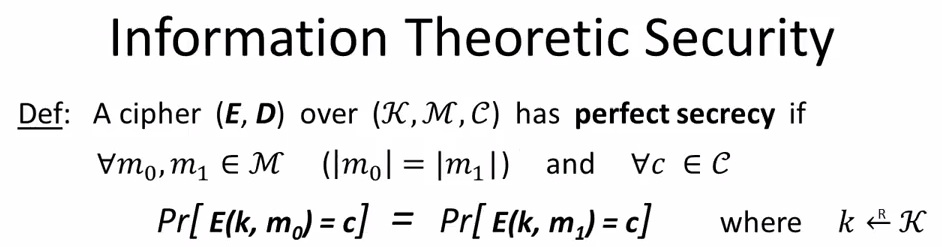
In the end, I finished the video which covers OTP (one time pad). It is good to learn Shannon’s research about the full secrecy around cryptography – Shannon Secrecy

I took a screenshot of the professor’s lecture:

information_theoretic_security