https://code.google.com/p/gbif-providertoolkit/wiki/TomcatInstallationMacOSX
If you’re seeing this page via a web browser, it means you’ve setup Tomcat successfully. Congratulations!
https://code.google.com/p/gbif-providertoolkit/wiki/TomcatInstallationMacOSX
If you’re seeing this page via a web browser, it means you’ve setup Tomcat successfully. Congratulations!
Nutch Hadoop Tutorial – This is a tutorial that shows you how to set up Apache Nutch on a running hadoop cluster and won’t dive into the architect detail too much, which is a perfect tutorial for me.
A few assumptions before following this tutorial:
1. root 2. ssh 3. cluster 4. maillist for Q&A 5. Java programming background
Hadoop Cluster Setup:
Download Hadoop and Nutch:
Setup the Deployment Architecture
Deploy Nutch to a Single Machine
Deploy Nutch to multiple Machines
Performing a Crawl
Testing the Crawl
Performing a Search
I randomly came across a post from Kaggle, which is actually part of a tutorial competition showing people how to get started with machine learning.
More information about the famous MNIST dataset, which is used in this competition, could be found here. I remembered that Andrew Ng’s online class has demonstrated how to do image recognition, using different types of algorithms. However, while I was taking his class from Coursera, the software the class used was Octave. I am mostly using R and I want to give it a try with R.
After I downloaded those MNIST dataset files, again, I realized it is not that easy as I expected. All the files are in binary format and I have never dealt with binary files in R. After a quick good, I know there is a file named after me :), “readBin”. And fortunately, I found a paragraph of R code in git written by brendano, which works out of box.
However, 知其然知其所以然(we should know the hows and also the whys). Here is a very useful post from IDRE – Institution of Digital Research and Education from UCLA.
If you think binary data set is faraway from your life, you are wrong. The `save` command in R, actually store the data in binary format. “Saved R objects are binary files, even those saved with ascii = TRUE, so ensure that they are transferred without conversion of end of line markers and of 8-bit characters. The lines are delimited by LF on all platforms.”
Say you have a column which contains categorical variables / factors. Then How can we quickly and confidently identify the differences between different categories?
A very commonly used dataset ‘mpg’ from the package ‘ggplot2’ contains some categorical variables that could easily get started. There is a column in mpg called ‘cty’ which is the miles per gallon for a car while driving in city. And also another column ‘manufacturer’ which contain categorical variable the different manufacturers.
library(ggplot2)
data(mpg)
bymedian = with(mpg, reorder(manufacturer, -cty, median))
boxplot(cty ~ bymedian, data = mpg, varwidth = TRUE)
result = aov(formula = mpg$cty ~ as.factor(mpg$manufacturer))
TukeyHSD(result)


Background Story:
Sir Francis Galton, who is the cousin of Charles Darwin was an English Victoria polymath, eugenicist and statistician. He proved the linear combination of normal distribution is still normal distribution and he is also,the inventor of the triangle device – quincunx. Here, we will talk about the research that he has implemented long time ago(1885).
library(UsingR)
data(galton)
par(mfrow=c(1,1))
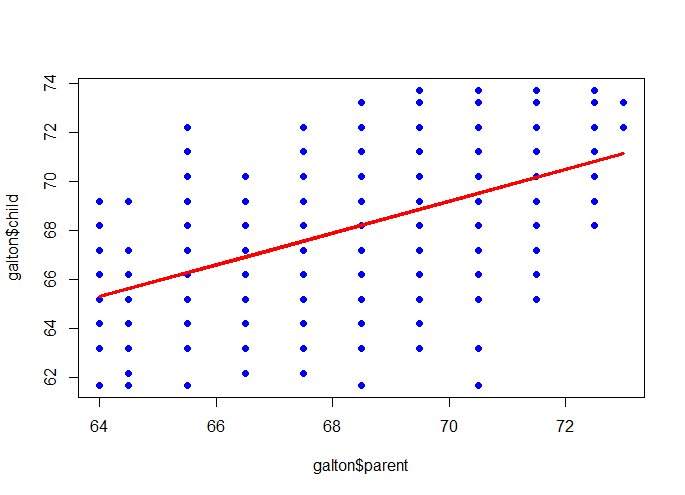
plot(galton$parent, galton$child, pch=19, col=”blue”)
m <- lm(galton$child ~ galton$parent)
lines(galton$parent, m$fitted, col=”red”, lwd=3)
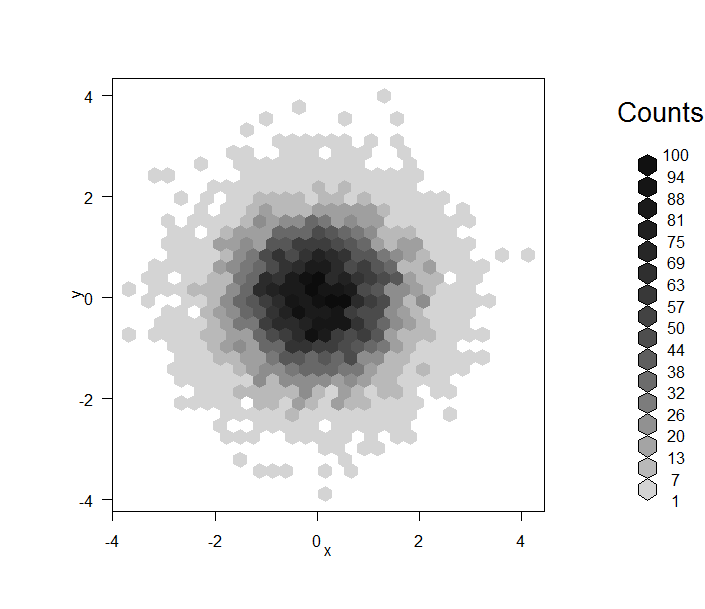
First, and the most horrible one when you have so many points:
data = data.frame(x=rnorm(1e4), y=rnorm(1e4))
plot(data, pch=19)

smoothScatter(data)

library(hexbin)
plot(hexbin(data))
library(ggplot2)
ggplot(data, aes(x=x,y=y)) + geom_point(alpha=I(1/3))

I always use histogram command to look at the distribution of a uni-variable data. And to distinguish the difference of distribution of a subgroup from the whole, I usually do two or more plots with the same scale.
data(mtcars)
par(mfrow=c(4,1))
hist(mtcars$mpg, breaks=20, col=8, xlim=c(10, 40), main=’total’)
hist(mtcars$mpg[mtcars$cyl==4], breaks=20, col=3, xlim=c(10, 40), main=’V4′)
hist(mtcars$mpg[mtcars$cyl==6], breaks=20, col=4, xlim=c(10, 40), main=’V6′)
hist(mtcars$mpg[mtcars$cyl==8], breaks=20, col=5, xlim=c(10, 40), main=’V8′)

You can clearly read the information that the more cylinders you have in your car, the more gas it will take in general, of course, a lower MPG (Miles Per Gallon).
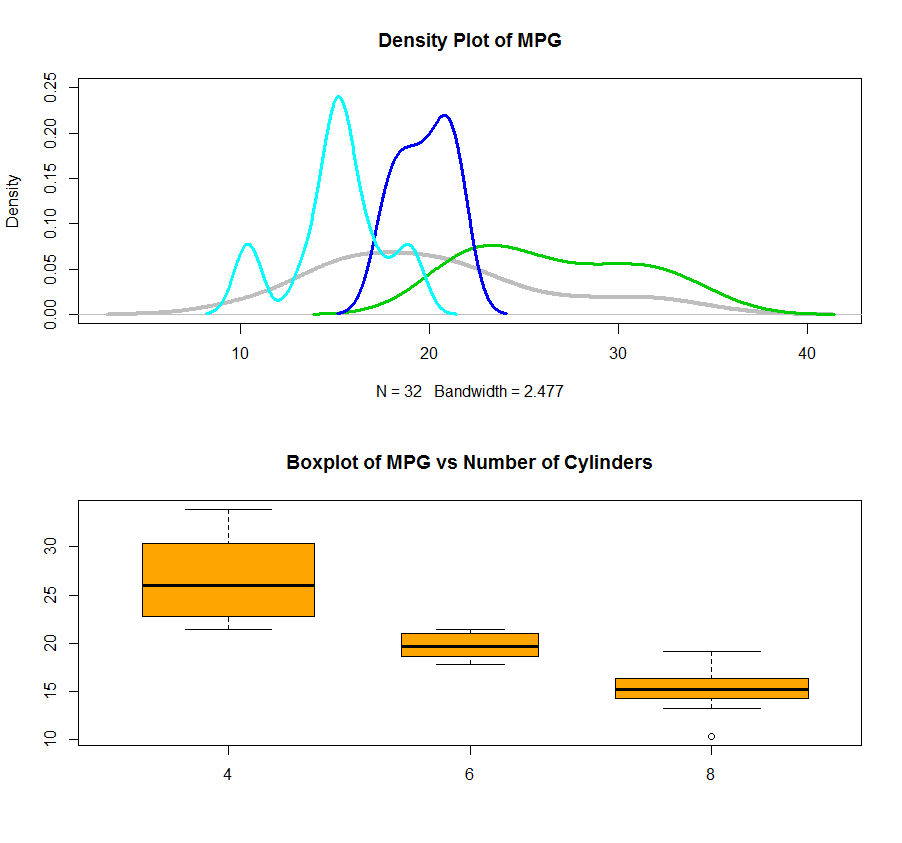
Also, you can use the density plot to see the distribution of data for each cylinder and plot them all together in one plot. I also attached a boxplot using factor which give a better picture of what is going on. By the way, the varwidth=TRUE will set the width of the box as the number of records in that box. In this case, you will see we have almost same amount of records inside each category.
dens = density(mtcars$mpg)
dens.4 = density(mtcars$mpg[mtcars$cyl==4])
dens.6 = density(mtcars$mpg[mtcars$cyl==6])
dens.8 = density(mtcars$mpg[mtcars$cyl==8])
par(mfrow=c(2,1))
plot(dens, lwd=4, col=8, ylim=c(0, 0.25), main=”Density Plot of MPG”)
lines(dens.4, lwd=3, col=3)
lines(dens.6, lwd=3, col=4)
lines(dens.8, lwd=3, col=5)
boxplot(mtcars$mpg ~ as.factor(mtcars$cyl), varwidth=TRUE, col=’orange’, main=”Boxplot of MPG vs Number of Cylinders”)
1. zoo: S3 Infrastructure for Regular and Irregular Time Series
2. Reshaping Data with the reshape Package
3. Tidy data (submitted only from Hadley Wickham)
Contents cited from Coursera class Data Analysis from Johns Hopkins University by Jeff Leek. The dataset that Jeff was working with comes from the package kernlab (kernal based machine learning lab).
library(kernlab); data(spam); set.seed(3435);
trainIndicator = rbinom(4601, size=1, prob=0.5)
table(trainIndicator)
0 1
2314 2287
# table command here is called: Cross Tabulation and Table Creation which comes very handy
1. Look at the training set with the commands: names(data), head(data), table(data$col)
2. Plot
plot(log10(trainSpam$capitalAve+1) ~ trainSpam$type)
# you can also use pairs command here
plot(log10(trainSpam[,1:4]+1)) 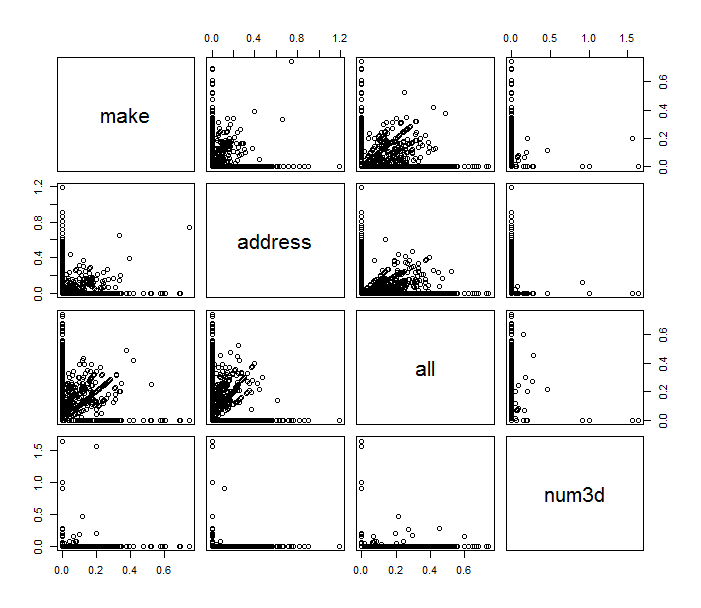
plot(hclust(dist(t(log10(trainSpam[, 1:57]+1))))) 
# the code below demonstrate a basic process for statistical prediction/modeling
trainSpam$numType <- as.numeric(trainSpam$type) – 1
costFunction <- function(x,y) {sum(x!=(y>0.5))}
cvError = rep(NA, 55)
library(boot)
for(i in 1:55){
lmFormula = as.formula(paste(“numType~”, names(trainSpam)[i], sep=””))
glmFit = glm(lmFormula, family=”binomial”, data=trainSpam)
cvError[i] <- cv.glm(trainSpam, glmFit, costFunction, 2)$delta[2]
}
# measure of uncertainty
predictionModel <- glm(numType ~ charDollar, family =”binomial”, data=trainSpam)
predictionTest <- predict(predictionModel, testSpam)
predictedSpam <- rep(“nonspam”, dim(testSpam)[1])
predictedSpam[predictionModel$fitted > 0.5] = “spam”
table(predictedSpam, testSpam$type)
– predictedSpam nonspam spam
– nonspam 1348 398
– spam 81 481
(We can see the spam classifier we built only using the dollar sign did a pretty good job for non spam emails but for spam emails, the output turned out to be half and half)
And the error rate is about 22%
Say, you have a time series object that you want to work with. You might want to check if the time series happens to be generated by white noise only, this might happen not only during the interview but also in real life sometime.
If you have three contiguous time points, assuming they are of different values. Then there are 6 permutations to order them. And four of them form a turning point (PEAK/PIT).
The expectation of number of turning points for a time series generated by white noise is then 2/3 * n, and actually they falls into a normal distribution where the variance is 8/45*n.
So your 5% confidence test should check if the number of turning points is within the range of: 2/3*n +- 1.96*sqrt(8/45*n):
require(pastecs)
data <- rnorm(10000, 0, 1)
plot(data)
limit <- function(n){
print(2/3 * n)
print(2/3 * n – 1.96 * sqrt(8/45 * n))
print(2/3 * n + 1.96 * sqrt(8/45 * n))
}
turnpoints(data)
limit(10000)
OUTPUT
> turnpoints(data)
Turning points for: data nbr observations : 10000 nbr ex-aequos : 0 nbr
turning points: 6657 (first point is a peak) E(p) = 6665.333 Var(p) = 1777.456 (theoretical)
> limit(10000) [1] 6666.667 [1] 6584.026 [1] 6749.308
You can clearly see that the fake time series does actually have 6657 turning points and it has been tested falls into our “BLACK LIST INTERVAL”!

