AWS – RESTful API – Part I Lambda

Introduction

As the Cloud providers are coming up with more and more services, the life of being a software developer just becomes easier and easier. As to get something up and running usually requires many technical aspects which one individual can hardly gain. Now many of the ground work got packaged and handled well by the cloud, usually a small team or even individuals can focus on the “coding” rather than the “administration”. In this post, I will document my first experience of leveraging AWS Lambda and API gateway to build a RESTful API, using Python.

As a Python developer, usually the go-to solution is to prototype an API using frameworks like Django or Flask. However, getting something up and running on your laptop is not sufficient. In order for any API to be online, there are many requirements like it needs to be hosted in an environment outside your laptop, logging and auditing, monitoring, load balancing, authentication and authorization and even auto scaling. It is very hard work but sometimes, actually most times not very exciting. I certainly see more people who prefers to develop new features during the day time rather than keep the lights on during the night time. Cloud providers are here to achieve the purpose of facilitating developers and take those ground work away.

In this little project, I am planning to have an API that the client can submit a URL, and check if a certain keyword exists on the page or not. Of course, you can find most of the instructions just by reading AWS Lambda’s user guide.

Hello World

First, you can start by logging into your AWS console and navigate to the page for Lambda.
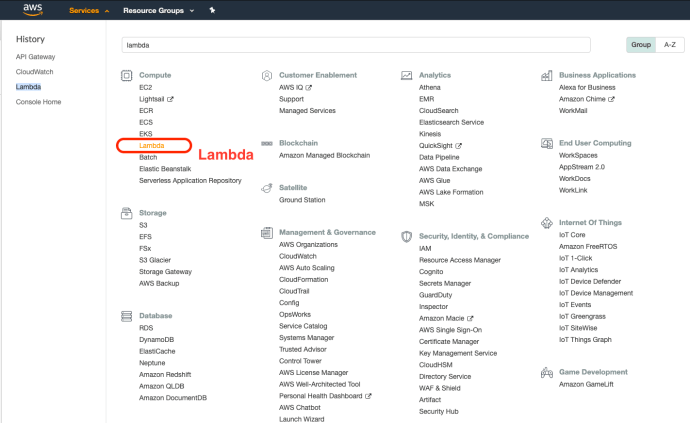
Screen Shot 2019-11-23 at 6.38.15 PM

The lambda console is extremely clean, as the service itself :). The easiest place to get started is to create a function by using one of its blueprints. The sample functions range from easy ones like an echo API to complex API with hundreds of lines of code using machine learning. Hello-World-Python is a very great starting point.
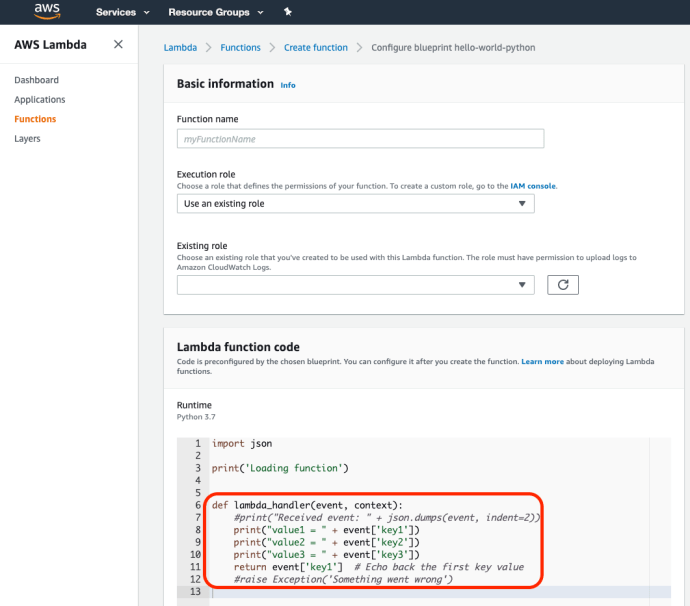
Screen Shot 2019-11-23 at 6.41.23 PM

If you have used Flask or Django before, the resemblance is uncanny. The event object here in the handler is very much like the requests from flask and it stores the payload.

One thing worth highlighting is that AWS Lambda supports not only Python, but also many other languages, it even support many different versions of Python from classic 2.7 to 3.8 as the date this post was written, here is another blueprints using node.js.
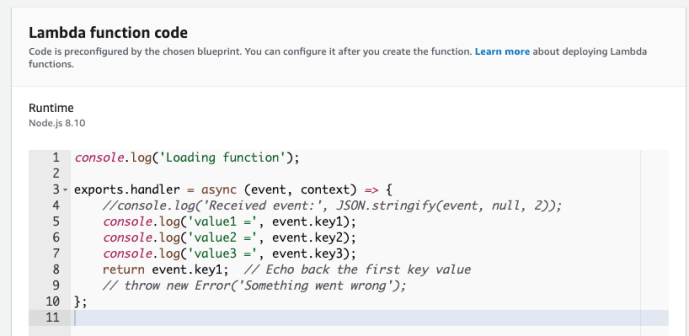
Screen Shot 2019-11-23 at 6.49.58 PM.png

By creating a handler, you can submit and you are almost ready to go.
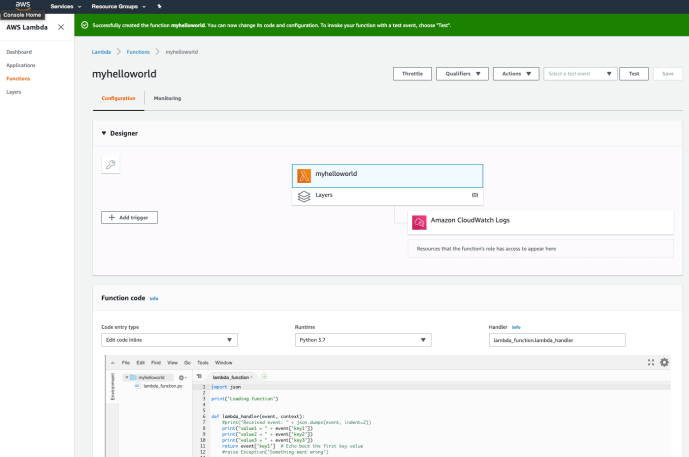
Screen Shot 2019-11-23 at 6.52.45 PM

Immediately, you will have a lambda function, along with Amazon CloudWatch Logs. Your print statement or even future highly customized logging events will be stored there for debugging purposes. In the bottom of the console, there is an embedded IDE in which you can do some basic development. In order to “run” your code, you can create a test case by passing in some data to test your lambda function.
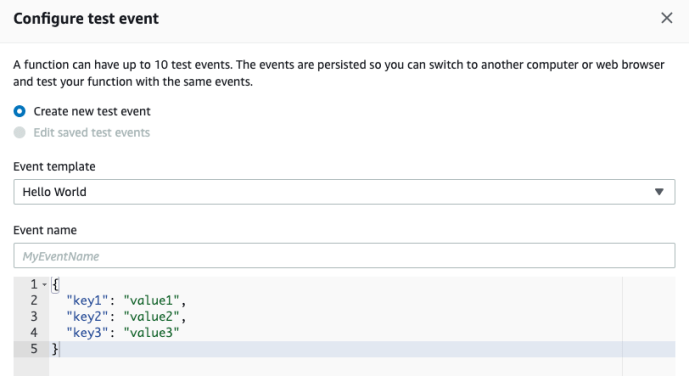
Screen Shot 2019-11-23 at 6.53.45 PM

And you can check out the test result to make sure everything is fine.
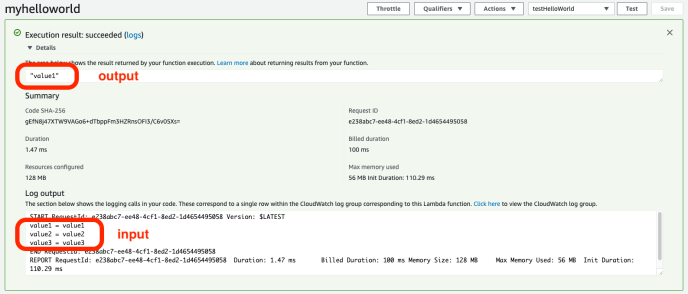
Screen Shot 2019-11-23 at 6.59.22 PM

Virtual Env

For our use cases, it won’t be as simple as the hello world. As we will need to use some 3rd party libraries like requests to scrape user submitted site, parse it using a library maybe like beautifulsoup. Each programming language has its own ways of handling dependencies, the Python go-to solution is usually by creating a dedicated environment for your application, so you can pinpoint which libraries you have to use in the end. And then figure out a way to pass that the whole environment or requirements to a new environment. AWS already took this into heart and provided a good solution by using virtualenv. You can find the detailed instructions here. You basically follow the following steps:

  1. create a virtual environment
  2. develop the function there with necessary libraries installed
  3. zip the libraries along with the python function you wrote
  4. submit to lambda

My code is super simple.
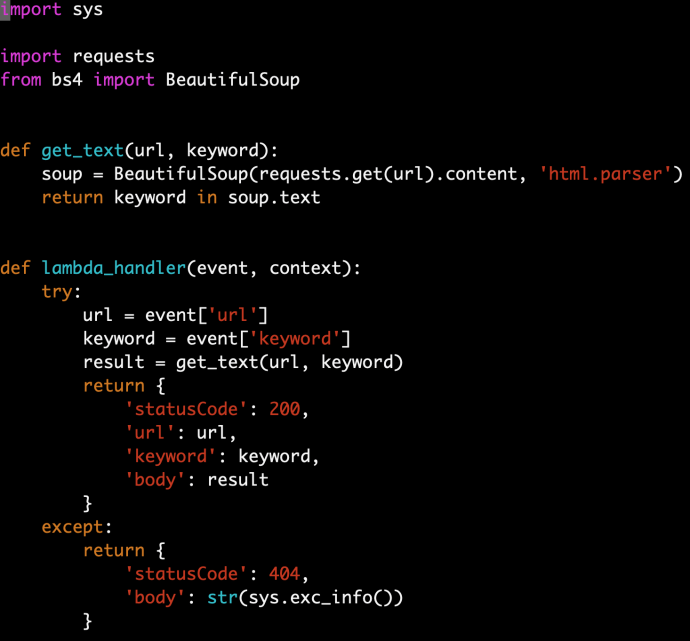
Screen Shot 2019-11-23 at 7.09.28 PM.png

And in the end, the zip file (function.zip) is only 4.7MB. So we can upload it AS-IS, however, if your environment is a bit large, for example, if you use some heavy duty libraries like sklearn or tensorflow, you can easily exceed the limit of 50MB which then you have to use S3 to store it first.
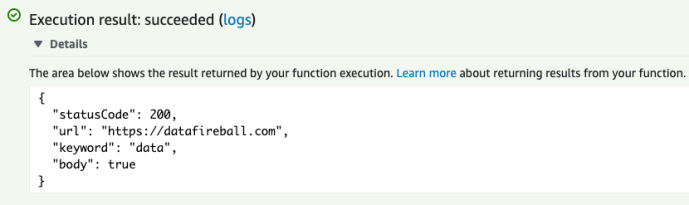
Screen Shot 2019-11-23 at 7.14.16 PM

There are still a few configurations that you can make in the Lambda function console:

  • concurrency
  • time out in seconds
  • audit using cloudtrail
  • memory usage
  • error handling

However, you don’t have to do any of these if you don’t want to change the default.

AWS CLI

Again, whenever you use your mouse, you know that next time you still have to do it. For example, if you are developing more future versions of the same API or even want to create more Lamda functions, logging into the console might become a bit tedious and subject to error. After a few times, you can script your workflow using AWS CLI through the command line or event using Python to call boto3 to achieve the same goal.

The installation is pretty trivial and the set up is also only one time. The first time you use AWS CLI, you do have to copy paste a few commands from the tutorial or tinker with the command line help to get all the arguments right. However, like programing, once you get it done right once, next time is just cookie cutting and can also be automated if needed.

Conclusion

Now we have a Lambda function just like that, however, lambda itself is not necessarily a web service yet. Lambda can be integrated into many other components within the AWS ecosystem but in the next post, we will use AWS API Gateway to put a wrapped on top of it so it becomes an endpoint that is visible to the public.


Best First Tree Builder

In the _tree.pyx file, there is a very interesting implementation of a type of TreeBuilder called the BestFirstTreeBuilder. The __cinit__ is very boilerplate but all the intelligence actually sits in the build method.

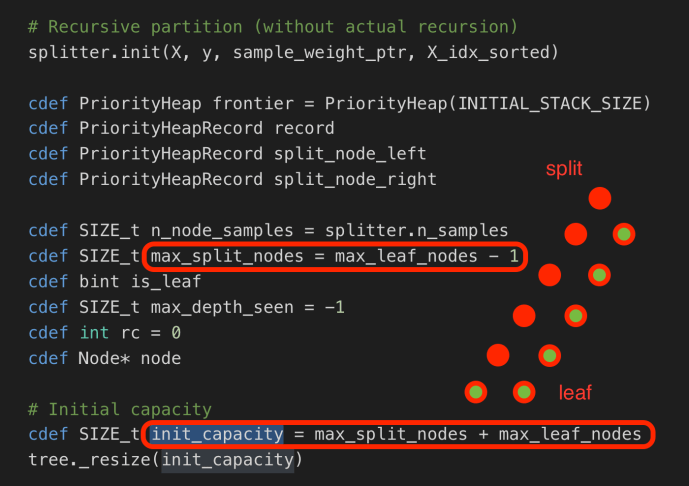
In the BestFirstTreeBuilder, they used the data structure PriorityHeap to implement the priority binary tree. There are two key variables, the max_split_nodes and max_leaf_nodes which are being used to declare the initial capacity.

Screen Shot 2019-10-27 at 9.52.43 AM

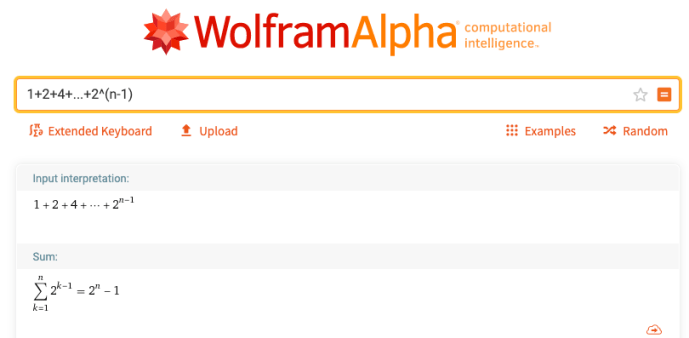
In a complete binary tree, if root is at the depth 0, then at depth n, you will have 2^(n) total leaves at the bottom of the tree. And all the nodes above will be split nodes. And in total, you will have 1+2+4 … = 2^0 + 2^1 + 2^2 + … + 2^(n-1) = 2^n – 1. That is why max_split_nodes = max_leaf_nodes – 1 and initial capacity is the sum of those two. Screen Shot 2019-10-27 at 9.58.24 AM

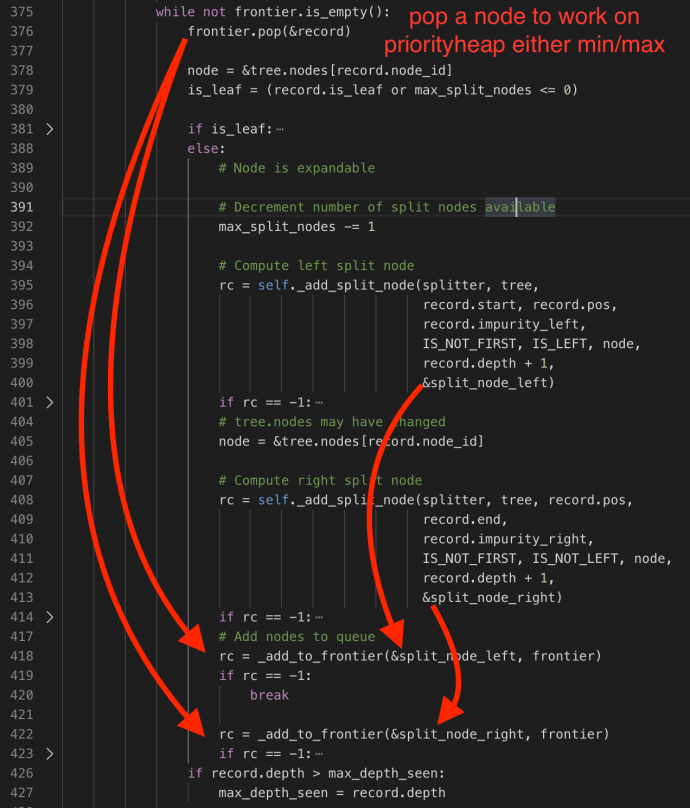
Then the rest of the build method will recursively build the tree following the “priority”.

Screen Shot 2019-10-27 at 10.10.30 AM

There are two methods which we will cover here. self._add_split_node will compute the split node and _add_to_frontier will add the split to the frontier.


Pickle

Here is a bit more about the Pickle and how you can customize how the pickling process work, use __getstate__ to customize how things got pickle.dumps and use __setstate__ to customize how things got pickle.loads.

It is not recommended but you can also use __reduce__ if you know what you are doing.

__getstate__ and __setstate__

Screen Shot 2019-10-27 at 11.00.40 PM

__reduce__

Screen Shot 2019-10-27 at 11.18.30 PM

cdef class Tree

Array-based representation of a binary decision tree.
    The binary tree is represented as a number of parallel arrays. The i-th
    element of each array holds information about the node `i`. Node 0 is the
    tree’s root. You can find a detailed description of all arrays in
    `_tree.pxd`. NOTE: Some of the arrays only apply to either leaves or split
    nodes, resp. In this case the values of nodes of the other type are
    arbitrary!

For a tree, it certainly has a few non-array attributes like node_count, capacity and max_depth. Other than those three, there are 8 methods which are arrays and all unanimously has the size of node_count.

1. children_left

each element stores the node id of the left children for the i-th node, of course, if i-th node doesn’t any child, it will use the value TREE_LEAF=-1.   As the binary tree always follow the priority that the left child will always has the values that smaller than the threshold. Of course, all the children have a node id greater than its direct split node so children_left[i] > i.

2. children_right

very similar to child_left

3. feature

feature[i] holds the feature to split on for the internal node i -> Key

4. threshold

threshold[i] holds the threshold for the internal node i -> Value

5. value

value is a bit complex, it has the shape of [node_count, n_outputs, max_n_classes]. The documentation says “Contains the constant prediction value of each node.

6. impurity:

impurity at node i

7. n_node_samples:

holds the number of training samples reaching node i

8. weighted_n_node_samples:

holds the weighted number of training samples reaching node i
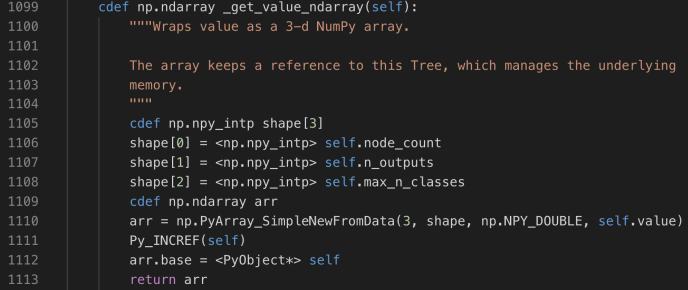
Screen Shot 2019-10-27 at 5.06.52 PMScreen Shot 2019-10-27 at 5.13.23 PM
In the tree method, there are not that many methods that meant to be used by the users, and the sklearn developers achieved this goal by forcing the methods to be only available in Cython by declaring them using cdef. However, there are still a few methods that are being defined using cpdef which must be familiar to most sklearn users.
1. predict(X)
Screen Shot 2019-10-27 at 8.38.47 PM
2. apply(X)
Screen Shot 2019-10-27 at 5.25.46 PM
3. decision_path(X)
The decision_path code is very similar to other methods which it look through all the samples, and within each sample, it will populate the outcome. However, within the code of decision_path, it has used the indptr and indices and also the pointer to these two arrays, indptr_ptr and indices_ptr to point to the data.
Screen Shot 2019-10-27 at 8.56.10 PM
If you are confused by indices, indptr and data, don’t worry, all those variables are the key variables for the CSR (compressed sparse rows) matrix in Scipy.
Instead of reading its official documentation, you can find this great Stackoverflow question. Here is a screenshot provided by user Tanguy explaining how those variables got put together.
csr.png
4. compute_feature_importances()
Screen Shot 2019-10-27 at 5.17.53 PM

SKLEARN SOURCE CODE TREE – PART II

This post dives into the sklearn decision tree building process.

The node_split method within the BestSplitter class is probably the most element implementation that I will say within the whole decision tree module. Not only it entails the implementation of the splitting process, but also demonstrated a myriad of core computer science concepts. Now let’s go through these 200 LOC and enjoy.

Screen Shot 2019-10-14 at 11.30.47 PM

In the method documentation string, it is mean to “Find the best split on node samples[start:end]”. Variable samples store all the samples, or each node_split is not necessarily running against the whole samples at every split. During each split, its range will target at the start:end range which will find the rotation later.

Meanwhile, at each node_split, its inputs include not only the latest impurity process, it also contains a pointer split to the split record, last but not least, for efficiency purpose, the splitters keep track of the number of constant_features so we can speed up the splitting by avoiding constant features, hence the comments below:

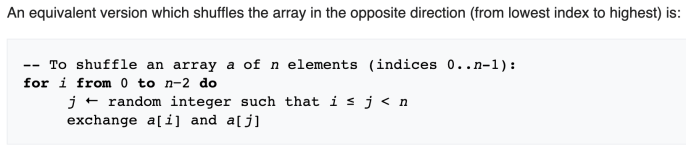
        # Sample up to max_features without replacement using a
        # Fisher-Yates-based algorithm (using the local variables `f_i` and
        # `f_j` to compute a permutation of the `features` array).
        #
        # Skip the CPU intensive evaluation of the impurity criterion for
        # features that were already detected as constant (hence not suitable
        # for good splitting) by ancestor nodes and save the information on
        # newly discovered constant features to spare computation on descendant
        # nodes.

First, let’s look at the outermost loop and its condition:

  1. f_i > n_total_constants
  2. n_visited_features < max_features
  3. n_visited_features <= n_found_constants + n_drawn_constants

condition 1 and (condition 2 or condition 3)

max_features is a an input variable that can be changed by the user, but default to be the total number of features. When float, it will analyze pick a fraction of all the features during the split or hard coded to be a specific number of features.

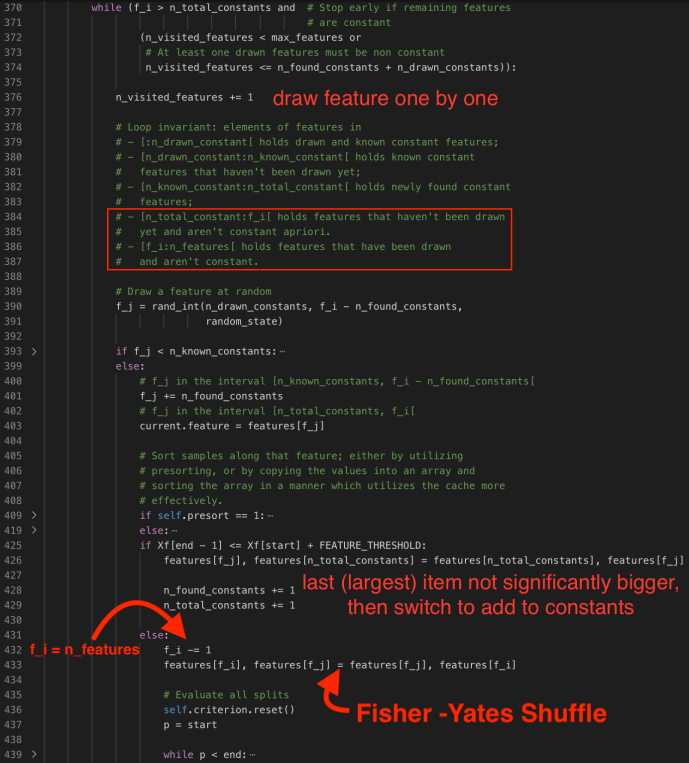
The implementation takes into account constant variables, and has several flags/counter to keep track in order to improve the performance. However, that might not help the reader so we will assume all the columns are not constant so any counter related to constant will be zero.

In that case, the while loop condition will be (f_i > 0 and n_visited_features < max).

n_visited_features is initialized to be zero and increases by 1 at each loop.

f_i was initialized to be n_features outside the loop, and at each loop f_j is randomly drawn from (n_drawn_constant, f_i – n_found_constants) ~ (0, f_i) when there is no constants. Of course, if we do have constants, f_j is meant to randomly select a feature that is not drawn nor not found constant.

When you draw the feature, the code checks what kind of feature this is, and update the related counter accordingly.

For example, as it is random sample without replacement, if it has been drawn, then it should not be drawn again, hence, f_j has to a random integer greater than the n_drawn_constants. f_j > n_drawn_constant.

At the same time, if f_j is smaller than n_known_constants, which means that we might have already known it is a constant without drawn yet (cache), then, we will mark this constant column as a drawn column by switch columns, append to the end of the drawn_constants range and update the n_drawn_constant counter by one.

Of course, we don’t know yet, we will update f_j by adding the identified/found constants so f_j is now pointing to the f_j th unidentified column and use it as the current feature.

Once we select a feature, then we will copy the column values to a new array Xf and sort the values. After we sort the values, then we will check to see if the column is close enough to be constant by comparing the min Xf[start] and max Xf[end-1] and see if the difference is smaller than feature_threshold. If so, of course, we will update the found_constants by 1 and total_constant by 1.

Of course, after all, if is not known constants, or if it is new but not constant, then we will go and find the split points by decreasing f_i by 1 and switch values of feature f_i and f_j. In that case, our randomly selected features will always be at the end of the list and slowly building up to the start of the queue.

Screen Shot 2019-10-14 at 10.55.54 PMScreen Shot 2019-10-14 at 11.10.55 PM

When the feature is properly sampled, they first initialize the position – variable p to be the start, the record index of the first sample. And it will go through each record. In addition, when it moves on to the next record, they FEATURE_THRESHOLD to make sure that it was not numerically equal, if so, they will skip to the next record which is materially different.

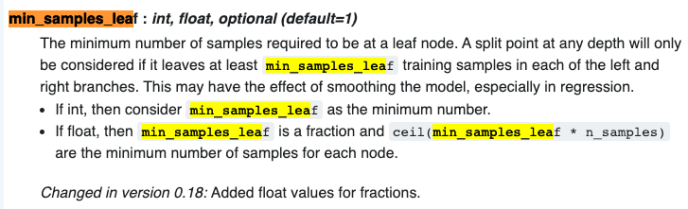
When sklearn is trying to find a split point during a continuous range, there is a very important user input called min_samples_leaf, which is defaulted to 1. When you build a decision tree, theoretically, you can train your model to be 100% accuracy during the training stage by creating a tree path which each unique record falls into its own path. Your model will for sure be big, and at the same time, you might be cursed with overfitting your data that during the prediction stage, the accuracy will be drastically lower. To avoid that, min_samples_leaf can be used to make sure you only create split point when the children has more than min_samples_leaf data. Here is the official documentation.

Screen Shot 2019-10-26 at 10.38.57 PM

The same idea applies to the min_weight_leaf in which instead of samples count, the requirements hold true for sum of weight.

After these two checks, they will calculate the criterion improvement and calculate with the record keeper until they loop through all positions and find the best split point and save that position as the best.

Screen Shot 2019-10-14 at 10.39.45 PM

After they find the best split point, they will “Reorganize” and actually split the samples using the best split point. Keep in mind that X still holds the raw samples and are NOT sorted. while p:= start < partition_end := end is an interesting way of splitting the data and sort into two subgroups in which left part of the array are always smaller and the right is always larger.

Here is a small Python script to demonstrate how it works, just to clarify, the data is still not completely sorted.

Screen Shot 2019-10-26 at 11.05.31 PM.png

Screen Shot 2019-10-14 at 11.19.24 PM

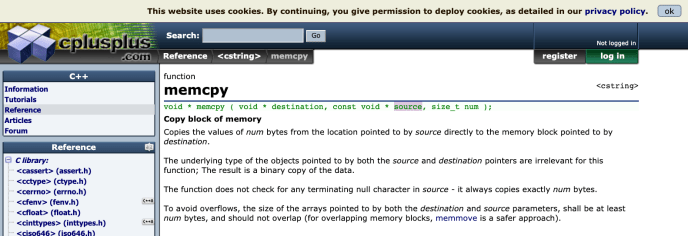
After the “Reorganization”, the memory of constant features will be copied and return the best split point.

Screen Shot 2019-10-26 at 11.15.35 PM.png

In summary, in this post, we have covered the split_node method with in the BestSplitter class. We looked at how they use Fisher_Yates random sample the features, for a given feature, how it find the best splitting point and at last, how it cleaned everything up and pass on to the children.


sklearn Source Code tree – Part I

This post, actually this upcoming series of posts, will be focused on gaining more knowledge of the exactly implementation of sklearn. Not only how in depth the algorithm got implemented, but also learning the best practices and styles of one of the most popular python library or even machine learning library out there. And today focus will be looking at the _tree.pyx.

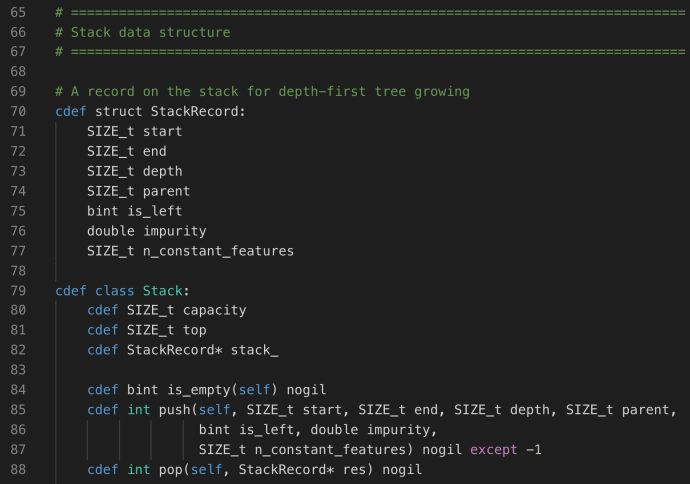
To really dive into the details of trees, one has to be familiar with the underlying data structure used for implementing a decision tree, or a tree in general. Under the _utils.pxd, can you easily find the declarations for two key data structures Stack and Priority Heap and its relevant implementation atomic unit – StackRecord and PriorityHeapRecord.

Screen Shot 2019-10-13 at 9.59.39 PM

No surprise, Stack is the commonly used data structure which supports FILO logic, hence, we have the push and pop method. Each record is actually fairly interesting which we are going to future explain what each attribute is being used for.

After that, it is another data structure called priorityHeap.

Screen Shot 2019-10-13 at 10.07.12 PM

I came across a great post about PriorityQueue with BinaryHeap which you can find the more interesting reading and Python implementation here. At a very high level, the regular Stack is used for depth first tree builder and the PriorityHeap is used for the best first tree builder. In the ideal world, both tree builders will lead to the same final tree but one is learning faster and usually is preferred when we need cut off the learning process early with pruning (like decision stumps in GBM). To simplify, we will start by focusing on depth first tree builder.

Now let’s switch our eyeballs to the _tree.pxd.

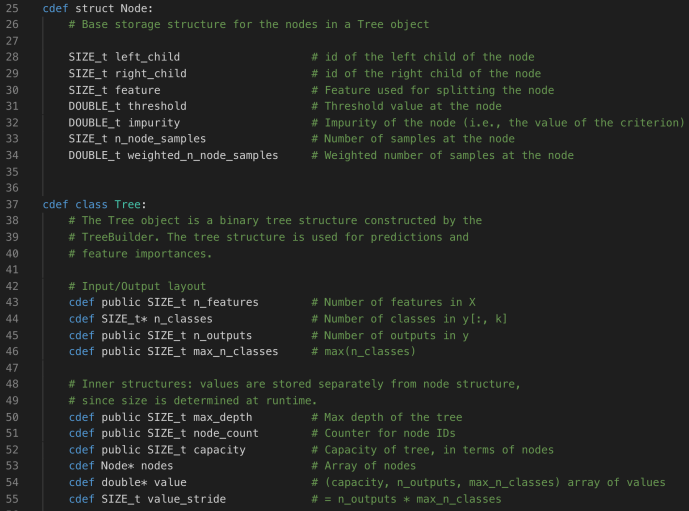
Like StackRecord, the atomic unit of a tree is node, and each node is made of its left and right child (identified by the ID), the split feature, the threshold (regression), impurity gain during split, and others.

Then let’s take a look at the Tree class’es attributes. Node* and double* are the two pointers/arrays that store the true content of a decision tree.

Screen Shot 2019-10-13 at 10.23.34 PM

Now we have skimmed through the basic data structures, let’s switch to the _tree.pyx implementation and take a look.

Screen Shot 2019-10-13 at 10.42.51 PM

The whole _tree.pyx isn’t quite complex, only ~1600 LOC and if we are only interested in the Tree class implementation and the easiest tree builder DepthFirstTreeBuilder, you only need to read a few hundreds of lines of code. So let’s get started.

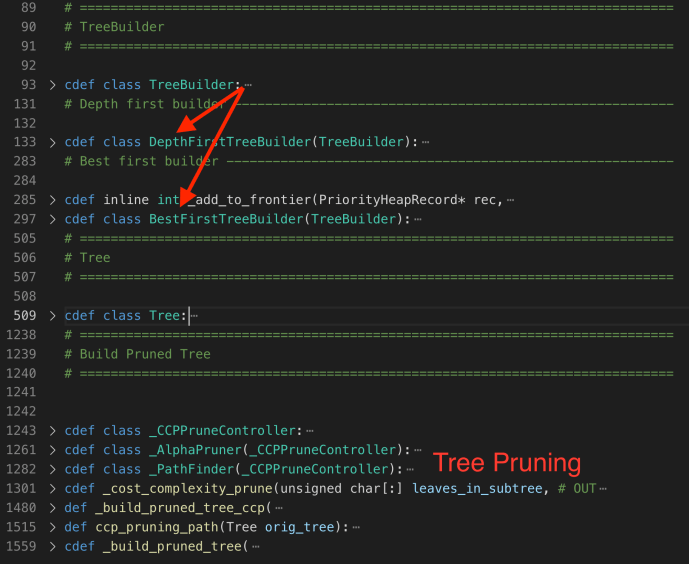
At the beginning, they first declared a TreeBuilder class as the basic interface which further got extended into different types of TreeBuilder (depth first or best first). It only has an internal method _check_input to ensure the data is contiguous.

Screen Shot 2019-10-13 at 10.29.41 PM.png

Across the whole implementation, there are numerous places that for performance reasons making calls to compress sparse matrix and others. Those functions play a pivotal role regarding making a python library fast enough but itself might deserve a dedicated series and less relevant to the tree implementation which we will skip for now.

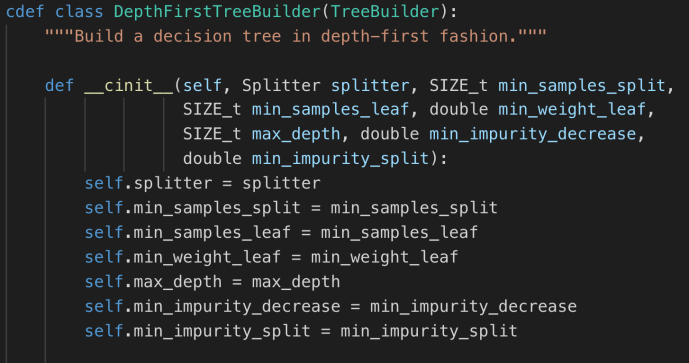
Screen Shot 2019-10-13 at 10.51.05 PMThe constructor of DepthFirstTreeBuilder includes several key parameters when builder a tree. Splitter is the various splitter implementation which we will cover later. Now let’s go through the build method and see how each attribute drives the building process.
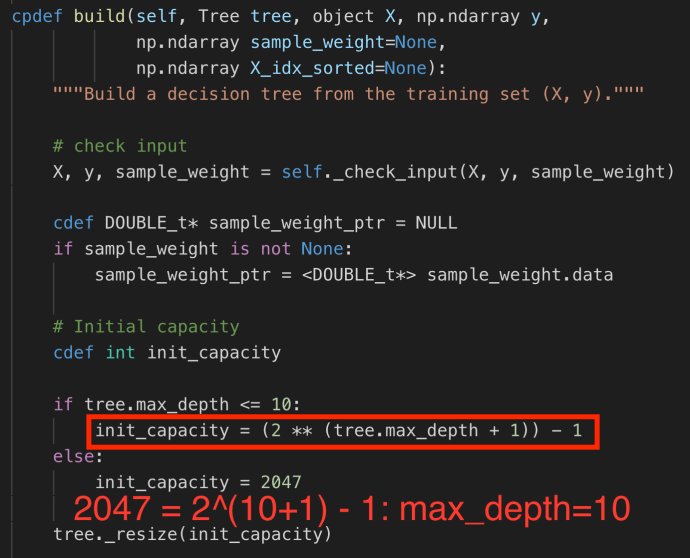
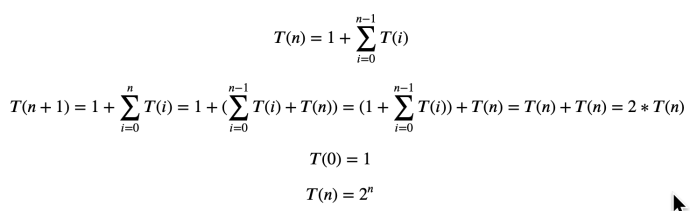
max_depth determines the maximum depth of the decision tree. As decision is a binary tree, when it is complete, the number of nodes grow exponentially. For example if you have 1 level, there are total 1 node, which is the root, if you have 2 levels, you have 3 nodes, and if you have three levels, you have 7 nodes, and when you have N levels, you will need 1+2+4+… = 2^0 + 2^1 + 2^2 + ..  2^ (N-1) = 2^N – 1 in total.

And as you can tell from the first few steps of the build method, that is exactly how max_depth is being used. Screen Shot 2019-10-13 at 10.56.29 PM.png

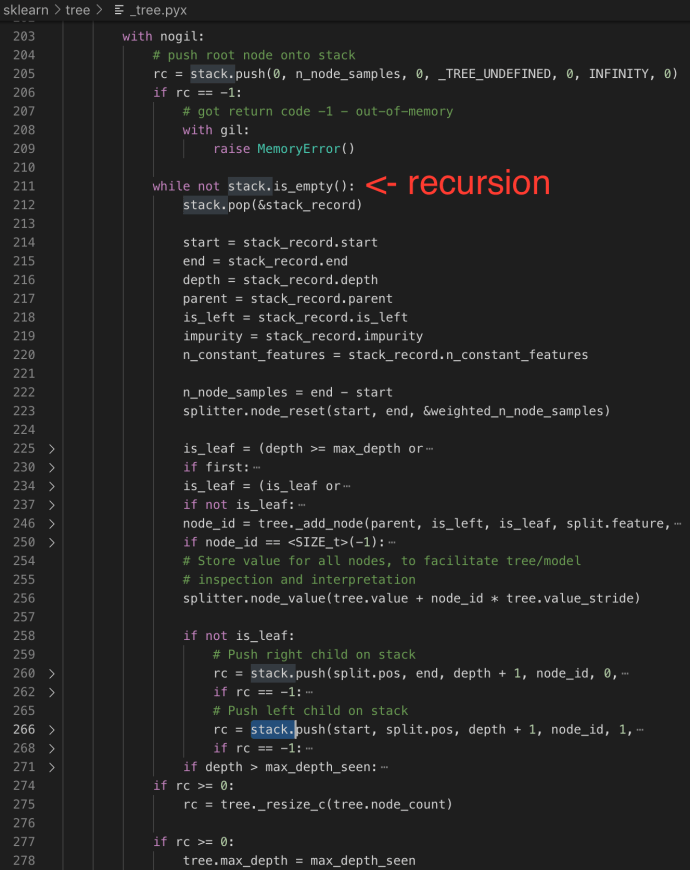
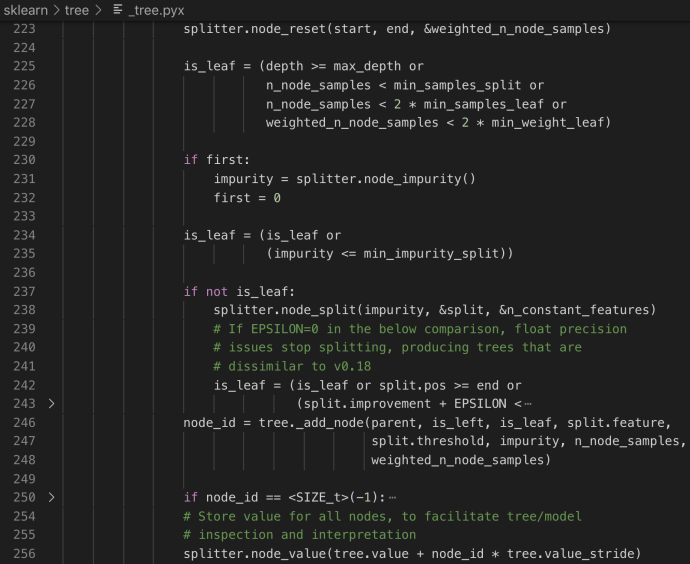
The next steps will be actually building the tree by working on the popped record and pushing its two children iteratively.

Screen Shot 2019-10-13 at 11.07.57 PM

As you can tell from the code, the stack will pop each record and replace with two children if any. And that is also the reason that why the stack has the size of INITIAL_STACK_SIZE which is 10, the same as the depth of the initial tree capacity. In this way, it will first build/traverse the left most branch and then bottom up, slowly transition to the right and traverse the whole tree with only a stack of 10 records. 

Now, let’s take a look at how splitter got called in the depth first tree building process.

Screen Shot 2019-10-13 at 11.36.10 PM

In the next post, we will spend more time looking into the node_split method and tree._add_node method to further understand the tree building details.


Python functools lru_cache

LRU_Cache stands for least recently used cache. I understand the value of any sort of cache is to save time by avoiding repetitive computing. Usually you store some computed value in a temporary place (cache) and look it up later rather than recompute everything. Functools is a built-in library within Python and there is a decorate lru_cache which is designed to help Python developers achieve similar goals.

So I have a dummy problem here, instead of the Fibonacci problem, it is even more exhaustive as the new item in the array need to be the sum of all its previous items plus 1. The level of complexity goes exponentially.

Screen Shot 2019-07-28 at 10.09.53 PM

Clearly, by computing n = 24 is already taking more than 6 seconds. However, by decorating the function using the lru_cache, it is as quick as 4 millisecond. You can also find out the cache info, the sheer amount of hits is a the secret of why the function has been sped up so much.

Screen Shot 2019-07-28 at 9.35.45 PM

The performance acceleration is outstanding and based on the definition of Dynamic programming, this is almost a necessity so developers can focus all their efforts into decomposing the problem into subproblems rather than worrying about manually storing hashtable somewhere for loop up.

Screen Shot 2019-07-28 at 8.37.29 AM

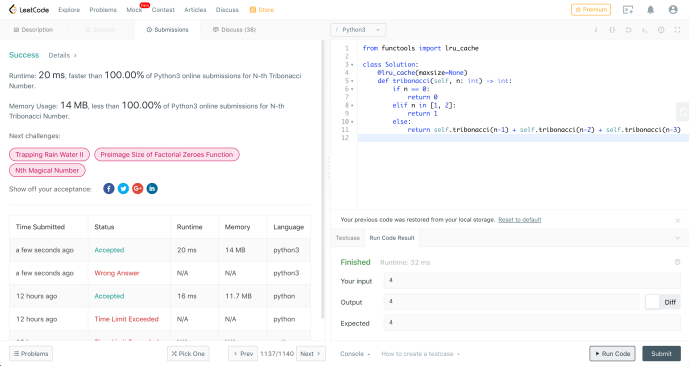
Attached is an example of by using the lru_cache decorator, how you can come up with a solution that outperform 100% of the Python solutions out there from leetcode execution time and space wise.

If you are interested in looking under the hood, it isn’t quite complex as all the utilities are written in Python rather than Cython, however, developers are only supposed to access the lru_cache through clear_cache or cache_info because it is believed that messing with cache through an threaded environment will cause unnecessary trouble. I tried to access some of the its private and internally attributes but failed to access the cache due to the fact that cache lives within the namespace of the wrapper and it is not accessible outside the function. This might be an interesting challenge to understand how to get it working.

James Powell 2017 Pydata talk – Python Expert

Mr. James Powell has given this great talk at 2017 Pydata at Seattle about some of the advanced features and concepts in Python (using Python3 but most features also apply to Python2).

Here is a list of some of the highlights that Mr. Powell covered which I want to listed here for later reference:

  • Data model – “dunder method”, double underline or data model
  • Library/user – assert, metaclass, subclass
  • Decorators – @ handy way of calling up a wrapper function
  • Generator – sequential, intermitting and memory efficient yield, __iter__, __next__
  • contextmanager – __enter__, __exist__

In the end, I came across this glossary page from Python’s documentation website which doesn’t hurt to use as a checklist or challenge.

CDN and Github – jsDelivr

Content Delivery Network (CDN)

In HTML, there are many tags, especially the ones related to Javascript requires reference certain script, also somethings requires link to certain stylesheet by including a CSS file in the link tag. However, there are times which you can include all the necessary dependencies as static at the same environment where the site hosts, by including the relative path, or you can add in the complete path in a URL format that can be hosted anywhere on the internet (usually on a CDN Content Delivery Network).

There are several benefits to it:

  1. Effectively offload the serving of those files to CDN servers (load balancing, performance optimization, etc.)
  2. The libraries and content is more abundant and complete at a central place like a CDN, so developer doesn’t have to shop around on the internet and download each dependencies and organize them on your own site for commonly used ones.

There are also cases in which you don’t even have full control over the site that you are working on. For example, you could be developing certain subsection of an important website which you only have limited permission to edit certain section, uploading dependencies is not an option. Also, if you are writing a Chrome extension, you could be injecting certain script into the target sites to manipulate the page, however, it is not realistic for you to upload your dependencies to like github.com/mydependency.js.

Of course, CDN is way beyond just serving little script but can expand to any kind of content serving.

JSDelivr

There are several sites like cdnjs.com which has plenty of Javascript modules or libraries. I came across this site called JSDelivr which looks like cdnjs.com but it has a few cool features like you can refer to any Github repos.

Screen Shot 2019-07-04 at 12.05.22 PM

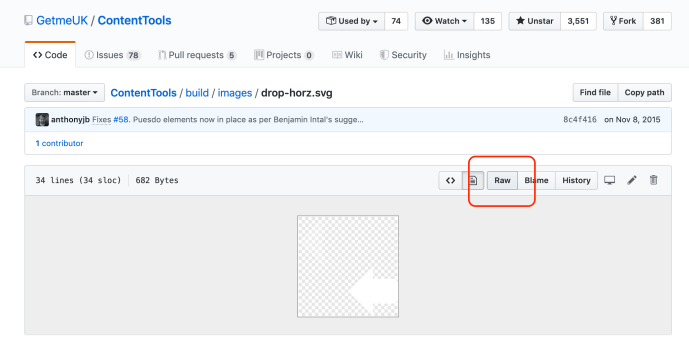
Of course, you can refer to any files on Github directly by using the link to the raw file hosted on Github. However, Github is just not meant to serve as a CDN and this solution sometime not as straightforward depending on the files types.

Screen Shot 2019-07-04 at 12.27.50 PM

By using jsdelivr, you can simply prefix the Github path by some jsdelivr URL and you are good to have. I have managed to replace all my reference to certain Github material using jsdelivr and it works great.


Laoshu50500

I know this post might be a little unorthodox but I just cannot wait to share this amazing Youtube channel laoshu50500 with the folks who might read my blog.

As a non-native English speaker, I have came across plenty of practitioners who claim to be bilingual, trilingual or multilingual, most of them mastered the foreign languages either by growing up in a diverse environment or affording the privilege of attending some sort of school and receive certain training.

The Youtuber Moses totally redefined all of my impression of language study by posting videos about how he practice foreign languages by self teaching and constant communicating. He brought so much happiness to the people around them, strangers just met by recognizing their identity, respecting their culture, and most importantly, working hard (maybe not that hard as he must be smart 🙂 ) to literally speak their language to show respect. It is not that one guy that can speak so many language impressed me the most, it is his humble attitude and his deep desire to practice, to learn and to communicate with another individual on such an equal basis that makes wonder, if everyone in a world spend just a little time to work hard and think/speak from a totally different identity, how much better this world will become.